






15+ Best AI Photo Enhancers to Improve Image Quality: Online & PC
Regardless of how high quality and excellent the megapixel camera you use to create the images, clicking the images with the annoying shortcomings is still possible. Hence, opting for the AI photo enhancer helps you to enhance your image without affecting the quality of the photos, taking the popularity and leverage of the images to the next level.
You can watch out for this fantastic tool to explore the 15 outstanding AI image enhancer-free tools for you.
Part 1. 5 Best AI Image Enhancer APPs on PC
1. The Best AI Image Enhancer with HitPaw FotorPea
If you're looking for an all-in-one AI photo enhancer that balances image quality, flexibility, and ease of use, HitPaw FotorPea stands out as one of the best options available. Unlike many AI enhancers that focus on only one task, it offers multiple AI models designed for different photo issues, including blurry images, old photo restoration, portrait enhancement, denoising, and image upscaling.
During testing, HitPaw FotorPea performed especially well on blurry portraits, low-resolution images, and compressed social media photos, producing clearer details without making images look overly artificial.
Another advantage is its batch processing feature, allowing users to enhance multiple photos at once without sacrificing image quality. Beyond enhancement, it also combines restoration and creative AI tools, making it useful for both photo fixing and content creation workflows.
Best for: users looking for an all-around AI photo enhancer for portraits, old photos, and low-quality images.
Features of AI Image Enhancer - HitPaw FotorPea- Best AI image enhancer for Mac and Windows
- It allows you to automatically enhance the image resolution and quality
- It lets you eliminate the blur and noise from the images
- Upscale and enlarge the portarit images without quality loss
- AI-generated images turn text into creative visuals instantly.




How to Enhance Image Quality with HitPaw FotorPeaa: Step-by-step
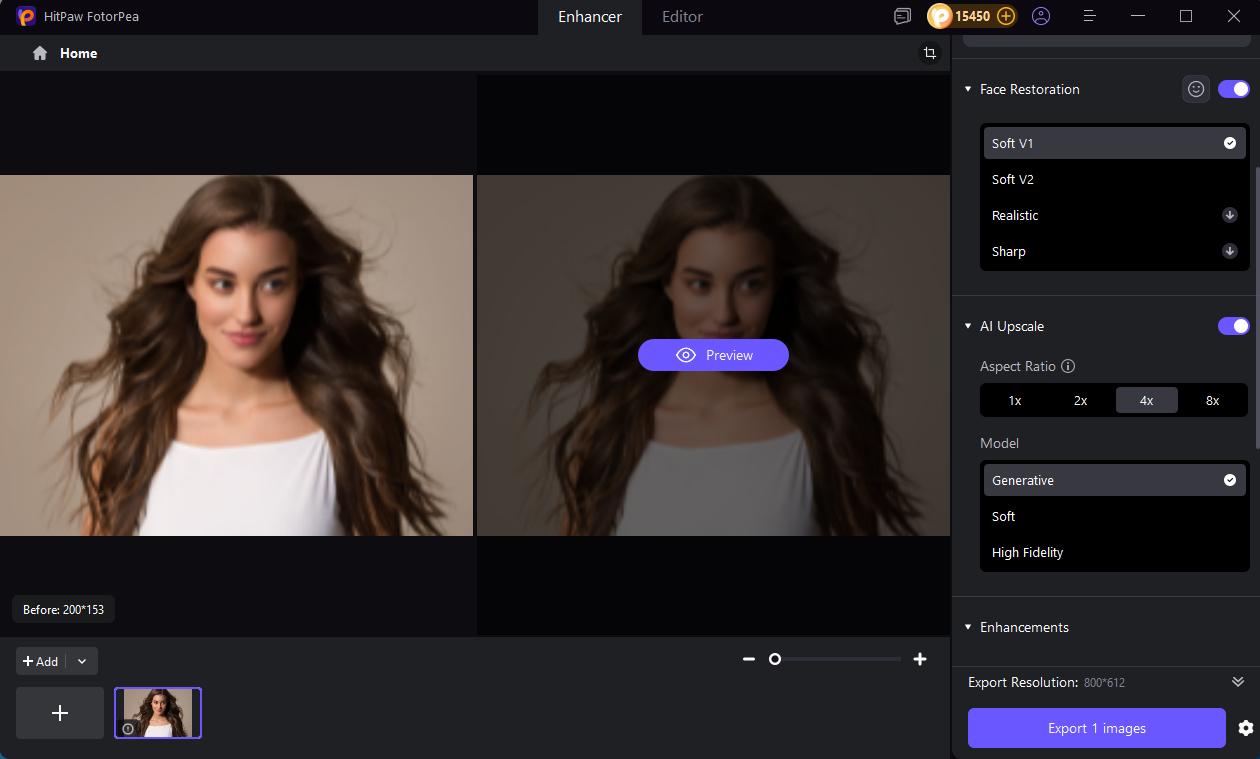
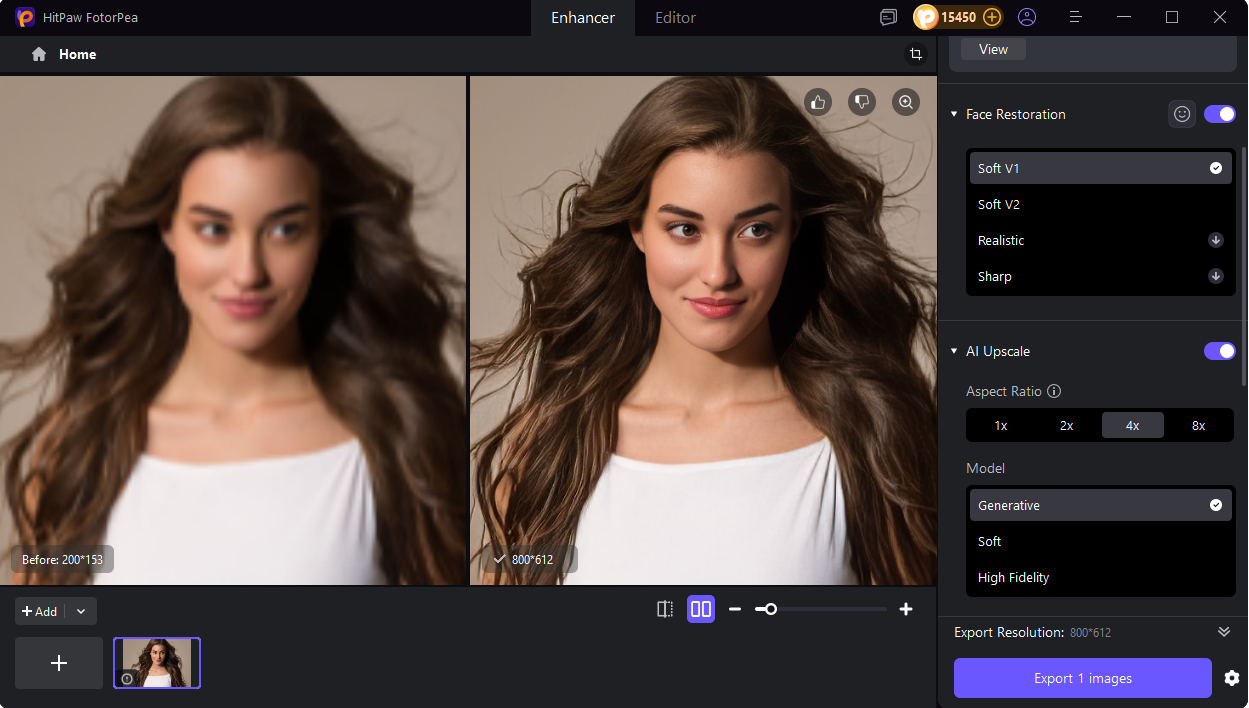
Step 1:Download and install the HitPaw FotorPea on the PC and click the Enhance Photos Now button afterward. Click on the Choose File button to import the photo you'd like to enhance.

Step 2:HitPaw FotorPea prompts various outstanding AI models, including the Face Model, General Model, Denoise Model, Low light model, scratch repair, color calibration model, colorize model, and Denoise model.
You can apply any one of these models to enhance the quality of the images, making them fascinating and wonderful.
Step 3:After applying the preferred AI model, you must click the Preview icon to review all the changes. Hit the Export button to get the images downloaded on the computer.

2. AI Picture Enhancer with VanceAI on PC
VanceAI is another solid AI photo enhancer designed for users who want to improve image quality with minimal effort. Powered by AI enhancement technology, it helps sharpen blurry photos, upscale low-resolution images, and improve overall clarity in just a few clicks.
However, compared with more comprehensive AI enhancers, its editing flexibility and enhancement options may feel more limited for advanced restoration, portrait optimization, or more demanding image enhancement needs.
Best for: users looking for a simple AI photo enhancer for basic upscaling and everyday image improvements.
- Easy to use
- Prompts the several unique AI models
- Doesn't tweak the image quality
- Doesn't insert the watermark
- Premium could be expensive.
3. Professional Image Upscaling with Topaz Gigapixel AI
Topaz Gigapixel AI is widely used by photographers and designers who need to enlarge images while keeping fine details intact. Rather than being a general-purpose photo enhancer, it focuses primarily on AI-powered upscaling, making it a strong option for low-resolution images, large-format printing, and professional photography workflows.
It performs particularly well when it comes to preserving textures, edges, and sharpness during image enlargement, with support for upscaling images up to 6×. However, users who need portrait retouching or more comprehensive restoration features may find it more specialized compared to all-in-one AI enhancers.
Best for: photographers and designers who need high-quality image upscaling for prints and professional visuals.
- Excellent AI image upscaling quality
- Preserves fine details and sharpness well
- Ideal for low-resolution images and large prints
- Supports up to 6× image enlargement
- Focused mainly on upscaling, not full photo enhancement
- Limited portrait and restoration tools
- May feel complex for casual users
Price: Starts at around $12–13/month (pricing may vary by plan and region).
4. RAW Photo Editing with Adobe Photoshop Super Resolution
For photographers and designers already using Adobe tools, Photoshop Super Resolution offers a convenient way to enhance image resolution without leaving the Adobe workflow. Integrated into Adobe Camera Raw, it is designed to improve image quality while preserving fine details, especially when working with RAW files and professional editing projects.
Because it is built directly into Photoshop and Lightroom, it fits naturally into existing editing pipelines without requiring additional software. However, compared with dedicated AI photo enhancers, it may feel less intuitive for beginners and more suited to users who are already familiar with Adobe’s ecosystem.
Best for: photographers, designers, and professionals who work within Adobe Photoshop or Lightroom.
- Seamlessly integrated into Adobe Camera Raw
- Strong performance with RAW images
- Maintains image quality during upscaling
- Efficient for existing Adobe workflows
- Requires Adobe subscription
- More suitable for professionals than beginners
- Less specialized than standalone AI enhancers
Price: Starts at $22.99/month for the Photoshop plan (pricing may vary by region and bundle).
5. Portrait Retouching with PhotoDiva
PhotoDiva is a practical option for users who primarily work with portrait photos. Instead of focusing on general-purpose image enhancement, it specializes in facial retouching, making it useful for improving selfies, portraits, and headshots with minimal manual adjustments.
The tool offers AI-powered features that help smooth skin, refine facial details, and enhance overall appearance while keeping the editing process simple and beginner-friendly. However, because it is mainly designed for portrait work, it is less suitable for users who need broader capabilities such as image upscaling or old photo restoration.
Best for: portrait photography, selfies, and facial retouching.
- Strong portrait enhancement tools
- AI skin smoothing and facial refinement
- Beginner-friendly interface
- Effective for selfies and headshots
- Focused mainly on portraits rather than general enhancement
- Limited upscaling and restoration features
- Windows-only platform
Price: Starts at around $5–6/month (billed annually, depending on plan and region).
Part 2. 7 Best AI Photo Enhancers Online
1. Quick Image Enhancement with Let’s Enhance
Let’s Enhance is a convenient web-based AI photo enhancer designed for users who want quick improvements without installing any software. It runs entirely in the browser, making it suitable for lightweight workflows and fast image adjustments.
The tool handles common enhancement tasks such as improving sharpness, adjusting colors, and reducing JPEG compression artifacts. It is often used for preparing images for social media, websites, or other everyday digital content. However, compared with desktop-based AI enhancers, it provides fewer advanced restoration and fine-tuning options.
Best for: quick online enhancement for web images, social media posts, and compressed photos.
- Fully web-based, no installation required
- Simple and beginner-friendly interface
- Good for fixing JPEG artifacts and improving clarity
- Fast processing for small batches or single images
- Limited advanced AI restoration capabilities
- Less control compared to desktop tools
- Requires stable internet connection
Price: Free tier available with limited exports; paid plans typically start around $9–15/month depending on resolution and usage limits.
2. Quick Beginner-Friendly Edits with Fotor
Fotor is a practical option for users who want a simple way to improve image quality without dealing with advanced editing tools. It combines basic AI enhancement features with an intuitive workflow, making it accessible across both web and mobile platforms.
The tool is commonly used for quick adjustments such as sharpening images, reducing noise, and lightly upscaling photos for everyday use like social media posts or simple design work. However, it is not designed for advanced restoration or professional-level editing tasks.
Best for: beginners who want fast and lightweight AI enhancements on web or mobile devices.
- Very easy to use
- Available on web and mobile (iOS/Android)
- Good for quick sharpening and noise reduction
- Fast results for casual editing needs
- Limited advanced AI enhancement controls
- Not suitable for professional or complex restoration
- Output quality may feel basic compared to desktop tools
Price: Free plan available; paid plans typically start around $8–10/month depending on features.
3. AI Pic Enhancer with Pixelcut
There won't be any better online AI quality enhancer than the Pixelcut. Apart from prompting the simple user interface, the significant thing to like about this AI photo enhancer is that it doesn't tweak the images, and you won't see unwanted ads appearing either.
- No installation needed
- Supports the multiple devices
- Lets you to remove the blur from the images
- Impressive user interface
- Limited free version
4. AI Image Quality Enhancer with Cutout. pro
If you are worried about the shortcomings of the images and would love to rip apart them, you can pay attention to Cutout.pro. It is another AI image enhancer free tool for the PC that doesn't ask you to do much to get the quality of the images upscaled automatically.
- Offers a simple user interface
- No image quality loss
- Offers several photo editing features
- Limited free trial version
5. AI Photo Quality Enhancer Free with Snapedit
If you can't install the AI image enhancer free tool on the computer and would love to go for the online AI photo enhancer, looking at the Snapedit won't be a bad decision. It is a mesmerizing AI image enhancer free that aims to eliminate all the bad things from the images, and it doesn't mess up with the quality of the images either.
- Prompts the manageable user interface
- No image quality
- Supports the multiple devices
- No watermark
- Multiple AI models to select from
- Unwanted ads might pop up.
6. AI Image Enhancer Online with Spyne
If you are interested in exploring some more online image quality enhancer, Spyne could come really handy. With the effortless user interface, this AI image enhancer online only asks to automatically import the images before upscaling the photos' quality.
- Simple user interface
- No image quality
- Several photo editing features
- Asks for a fast internet connection
7. AI Photo Enhancer Online with Neural.love
Neural. love is another excellent AI image improver that stimulates enhancing the photo quickly. Only visiting the official webpage of Neural.love will be enough to improve the photo quality, and this AI image quality enhancer doesn't come up with a watermark on the images.
- Prompts the simple user interface
- No image quality loss
- Explore the multiple amazing AI models
- Unwanted ads could come in. n
Part 3. 4 Best AI image Upscaler APPs on Mobile
1. Mobile Portrait Restoration with Remini
Remini is widely used for restoring old or low-quality portrait photos directly on mobile devices. It focuses on enhancing facial details, making it especially popular for improving blurry selfies and reviving old family photos with minimal effort.
It is mainly chosen by mobile users who want quick enhancements without using desktop software, particularly when working with heavily compressed or aged images. However, its strongest performance remains centered on portrait enhancement rather than general-purpose image editing.
Best for: restoring old portraits and enhancing smartphone photos on the go.
- Strong AI portrait restoration
- Mobile-first and very convenient workflow
- Good for old or blurry face photos
- Quick results with minimal input
- Limited versatility beyond portraits
- Free version has usage restrictions
- Less suitable for desktop-level workflows
Price: Free with limited credits; subscription typically starts around $5–10/month depending on region and plan.
2. AI Image Enhancer with YouCam Perfect
If you're a mobile user willing to go for an AI photo enhancer for mobile devices, you can go for the YouCam Perfect. Despite being designed for mobile devices, this free AI photo enhancer brings professional and advanced features to the table eliminating the shortcomings of the images.
- Simple user interface
- No image quality
- No unwanted ads
- Tons of photo editing functions
- It could take extra time to enhance the image quality.
3. AI Image Improver with Photo Editor Pro
Another amazing AI image quality enhancer you can watch out for is Photo Editor Pro. With the intuitive user interface and brilliant AI models, Photo Editor Pro ensures that you can rip apart all the shortcomings from the images quickly.
- Prompts the easy user interface
- No image quality loss
- Doesn't put the watermark
- Limited free trial version
4. AI Enhance Image with EnhanceFox
Whether you want to colorize the black and white images or restore the photos on the mobile device, you can't ignore the EnhanceFox. This AI pic enhancer doesn't bother affecting the image quality, and you don't even need to do much to take the quality of the images to the next level.
To apply the photo-enhancing techniques to the images, you'll only need to import the picture and add the fantastic editing operations in no time.
- Offers a simple user interface
- Supports the iOS and Android
- Prompts the several photo editing features
- Mo image quality loss
- Doesn't put the watermark on the images
- It might take some time before loading the images
AI Photo Enhancers Comparison: Online, Desktop & Mobile Tools
| Tool | Pros | Cons | Use Cases | Platforms | Score |
|---|---|---|---|---|---|
| HitPaw FotorPea |
|
|
|
|
9.5 |
| Topaz Gigapixel AI |
|
|
|
|
9.2 |
| Adobe Photoshop (Super Resolution) |
|
|
|
|
9.0 |
| PhotoDiva |
|
|
|
|
8.3 |
| Remini |
|
|
|
|
8.5 |
| Let’s Enhance |
|
|
|
|
8.2 |
| Fotor AI |
|
|
|
|
8.0 |
| VanceAI |
|
|
|
|
8.1 |
| Cutout.pro |
|
|
|
|
8.3 |
| Pixelcut |
|
|
|
|
8.4 |
| SnapEdit |
|
|
|
|
8.1 |
| Spyne |
|
|
|
|
8.2 |
| Neural.love |
|
|
|
|
8.4 |
| YouCam Perfect |
|
|
|
|
8.3 |
| Photo Editor Pro |
|
|
|
|
7.9 |
| EnhanceFox |
|
|
|
|
7.8 |
FAQ of Photo Quality Enhancer
Q1. What is the best 4K photo enhancer to improve image quality?
A1. HitPaw FotorPea is a 4K photo enhancer that restores details and sharpness in low-resolution or slightly blurred images, making photos clearer and more professional.
Q2. What is the best tool to enhance image quality online?
A2. HitPaw Online AI Photo Enhancer lets you enhance image quality directly in your browser, quickly removing blur and improving clarity without installing software.
Q3. How to fix blurry photos in an easy way?
A3. Use HitPaw FotorPea to fix blurry photos effortlessly: click Enhance Photo Now, upload your image, select the enhancement model, and start the process. The tool will automatically sharpen details and improve overall clarity in just a few clicks.
Conclusion
Although you can explore the hundreds of photo quality enhancers, finding the most appropriate AI photo enhancer is still tricky. You can take notes from this guide to explore the 10 high-quality and top-notch AI quality enhancer tools listed in this post.
Of all the tools you can explore from hereon, HitPaw FotorPea is the most recommended option. With the 7 AI models, this free AI photo enhancer improves the image quality automatically without asking you to do much.
 HitPaw VikPea (Video Enhancer)
 HitPaw Watermark Remover
  HitPaw Video Object Remover

Share this article:
Select the product rating:
Daniel Walker
Editor-in-Chief
This post was written by Editor Daniel Walker whose passion lies in bridging the gap between cutting-edge technology and everyday creativity. The content he created inspires the audience to embrace digital tools confidently.
View all ArticlesLeave a Comment
Create your review for HitPaw articles