

AI Image & Video Enhancement API with MCP Server
HitPaw’s MCP server brings the power of AI image and video enhancement directly into your favorite MCP-compatible platforms. You can instantly transform low-quality media into professional-grade visuals with advanced upscaling, denoising, detail restoration, and more—powered by intelligent, context-aware AI models.
 Upscaled — honey_4x.webp
 Request
detail_denoise
Unlock Seamless AI Media Enhancement with HitPaw API
Cinematic Video Fluidity & Clarity
Improve video smoothness, reduce shake and noise, and restore cinematic-level clarity with AI precision. Ideal for professional video production, streaming platforms, and post-production workflows.
Multi-Model Video & Image Enhancement
Access multiple AI models in a single API to upscale, denoise, restore, and improve photos and videos across diverse scenarios. Enjoy professional-quality results without managing individual models.
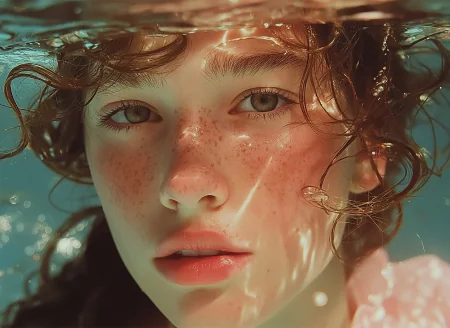
AIGC Content Refinement
Refine AI-generated images and videos by enhancing resolution, color accuracy, and fine details. Transform raw AIGC content into high-quality, visually compelling outputs ready for production.














AI Enhancement Becomes as Easy as A Single Command
API without MCP
- Limited control over server-side states
- Slower processing for high-volume requests
- Difficult integration with dynamic AI models
- Higher latency in multi-step workflows
HitPaw API with MCP
- Direct server-side tool integration
- Real-time context-aware enhancement
- Seamless multi-model orchestration
- Reduced latency with optimized data flow
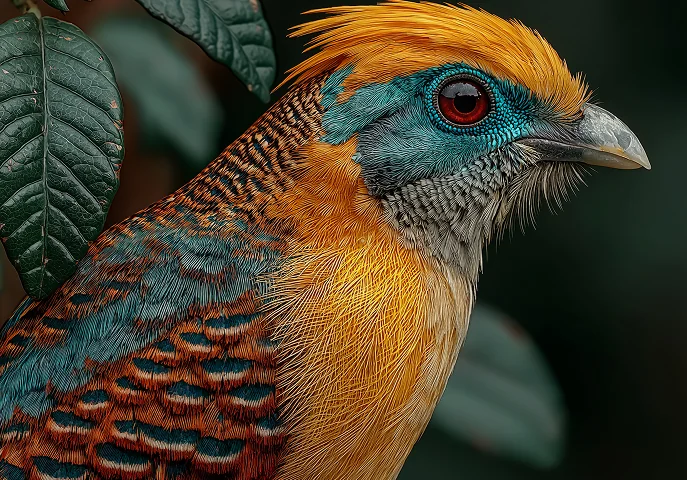
AI Models Powering HitPaw Enhancement API
The MCP (Model Context Protocol) Server acts as a unified hub that intelligently routes client requests to the most suitable AI models. By standardizing model access, it eliminates the need for developers to individually integrate and manage each model. HitPaw API’s MCP integration allows instant, plug-and-play access to advanced video and image enhancement models.
Developer APIs
Empower your software or SaaS with studio-grade image and video processing.

Creative Platforms
Seamlessly integrate AI enhancement features into creative platforms.

AI Tools & Agents
Allow AI assistants and agents to enhance media automatically via MCP.
HitPaw API Pricing
Provide users with powerful video and image enhancement APIs, and more enhancement models will be launched soon!
Free Plan
- 5000 credits for free
- Access to all AI models for testing
- User data will not be collected and leaked
Paid Plan
Starter Plans
Standard Plan
Pro Plan
- All AI models are available.
- Processing resolution up to 8K.
- Up to 250 images or 300s+ video processing. Up to 2500 images or 1600s+ video processing. Up to 10,000 images or 6400s+ video processing.
- A variety of export formats available.
Customized Plan
- Tiered Pricing: Lower cost per call with higher usage.
- Flexible Deployment: Supports private and hybrid deployment.
- Dedicated Support: 1-on-1 technical support with 24/7 response.
- Custom Services: Tailored features, billing, and invoicing options.
Cost Comparison: Low-Resolution Generation vs. 4K Generation
Compare the costs of generating footage directly in 4K with generating at a lower resolution and upscaling it using HitPaw Enhancement API—a workflow that can save you up to 95%.
| Model Name | 720p/min($) | 1080p/min($) | 4k/min($) |
|---|---|---|---|
| Kling 3.0 Omni | $7.56 | $10.08 | $25.20 |
| Seedance 2.5 | $13.56 | $33.55 | Not Supported |
| Veo 3.1 Standard | $24.00 | $24.00 | $36.00 |
| Runway Gen-4.5 | $7.20 | Not Supported | Not Supported |
| Vidu Q4 Preview | $5.70 | $7.20 | $23.40 |
| Wan 3.0 Video | $4.95 | $9.90 | Not Supported |
| Grok Imagine Video 1.5 | $8.40 | $15.00 | Not Supported |
| PixVerse V6 | $3.60 | $6.90 | Not Supported |
| Luma Ray3.2 | $5.4 | $21.6 | Not Supported |
| Model Name | 768p/min($) | 1080p/min($) | 2k/min($) |
| MiniMax-H3 | $4.48 | Not Supported | $7.71 |
| Model Name | Low Quality/image($) | Medium Quality/image($) | High Quality/image($) |
| GPT Image 2 | $0.006 | $0.053 | $0.211 |
| Model Name | 1k Resolution/image($) | 2k Resolution/image($) | 4k Resolution/image($) |
| Gemini Nano Banana 2.1 | $0.0336 | $0.0504 | $0.113 |
HitPaw API Enhancement Cost
Compare the cost of enhancing videos and images with HitPaw Enhancement API. The table below shows the pricing for enhancing videos and images to 4K resolution. For pricing details across different output resolutions and parameter settings, visit our API Pricing.
| Video Enhancement | Standard Restoration Models | Ultra HD Model | Generative Model | Frame Interpolation Model |
|---|---|---|---|---|
| 4K Upscaling Cost (USD/min) | $1.50 | $2.04 | $3.36 | $1.98 |
| Image Enhancement | Standard Models | Generative Models | Generative Enhance Model | |
| 4K Upscaling Cost (USD/Per Image) | $0.01 | $0.02 | $0.05 |
FAQs for HitPaw API
The Model Context Protocol (MCP) is an open, standardized framework developed by Anthropic and adopted by leading AI providers. It enables AI assistants and LLMs to seamlessly connect with external tools, APIs, and data sources, allowing them to execute tasks like media enhancement in a more intelligent and context-aware way.
The HitPaw MCP server allows users and AI agents to instantly enhance images and videos using natural language or automated workflows. It intelligently handles tasks like upscaling, denoising, and restoration, enabling real-time processing, previewing, and optimization—without requiring users to switch tools or manage complex integrations.
To enhance videos with the HitPaw MCP server, first obtain your API key and install the MCP server. Then configure your MCP-compatible client (such as an AI assistant) with the server details. Once connected, you can enhance videos through natural language commands or automated API calls within your workflow. For full setup and usage details, visit our official documentation.
Yes! Upon registering for the HitPaw API, you will instantly receive 1,000 free credits. This allows you to experience professional enhancement models firsthand—you can process up to 25 high-resolution 48MP images or approximately 65 seconds of 1080p/30fps video at no cost.
For images, credit consumption depends on your selected AI model and output resolution. You can find detailed rates on our Image Pricing page. Video processing is billed per second of output video. The rate is determined by the output resolution and the frame rate (FPS). Find details on the Video Pricing page.
Start Building with HitPaw AI Enhancement API
Integrate powerful AI enhancement capabilities into your applications or AI assistants today.

Get A Business Plan
Please fill out this form if vou want to purchase a business plan for more credits.
