






Waver 1.0: New AI Video Generator Model from ByteDance
 By Daniel Walker
Video content has become the heart of the digital economy. But, producing high-quality videos requires time, experience, and expensive equipment. But AI video generators are rewriting this rulebook, turning images or even simple text prompts into polished videos in just minutes. Among these new AI tools, Waver 1.0 has positioned itself as a next-generation solution for creators who want to product good video content without the high production overhead. In this review, we discover the capabilities of Waver 1.0, explore its strengths and limitations, and finally assess whether it is a viable choice for professionals.
 Tips: If you are not satisfied with the quality of video that was generated by Waver AI, HitPaw VikPea is recommended to create stunning AI Videos and upscale the video quality.




Part 1: In-depth Review of Waver 1.0 AI Video Generator
1. What Is Waver 1.0 AI

Waver 1.0 is an AI-powered video generation tool developed by ByteDance. It is the same technology company that is renowned for creating platforms like TikTok and CapCut. ByteDance Waver 1.0 was launched in 2025 and represents the company's continuous commitment to innovation. It offers a unified solution for creating high-quality videos from text and image inputs.
ByteDance Waver 1.0 is designed to empower creators across various industries by providing tools that simplify the video production process without compromising on quality. It offers features like multi-shot video creation, precise motion control, and more, allowing users to bring creative concepts to life without extensive technical knowledge.
2. Key Features of Waver 1.0
- Unified Framework: Supports text-to-video, image-to-video, and text-to-image generation in an all-in-one model for streamlined workflow.
- High Resolution: Generates 720p videos that can be upscaled to 1080p for professional-grade videos of 2-10 second duration.
- Impressive Motion Modelling: Waver 1.0 can capture complex movements in dynamic scenes that appear natural and temporally consistent.
- Multi-camera Storytelling: Provides native support for generating videos with multiple coherent shots. Waver 1.0 ensures high consistency of core subject, and maintains continuity of the overall style.
- Offers 5s and 10s Videos: Waver 1.0 can generate up to 10 seconds of video content at a time, and present a more complete expression of emotions and actions.
- Multiple Artistic Styles: The model can create videos in multiple artistic styles, including animation, extreme reality, plush, clay, and many more.
- Renders Action-Packed Sports Videos: Waver 1.0 can produce large-scale and complex movements like real athletes in their videos.
Part 2: How to Generate AI Videos with Waver 1.0?
- Step 1: Provide an Input Prompt
- Step 2: Adjust Parameters
- Step 3: Export Video
Upload an image or enter a text prompt detailing the scene extensively. Make sure you provide the details of the core subject, camera angle, lighting, scene, motion, and other background details.
Choose desired settings like resolution (up to 1080p), video duration (2-10 seconds), style preference, aspect ratio, and more.
Finally, generate the video. The request is usually processed in under a minute, thanks to GPU acceleration. Once completed, the video is available for download in MP4 format.
Part 3: Pros and Cons of Waver AI Video Generator
Like any emerging AI tool, ByteDance Waver 1.0 comes with notable pros as well as cons. Its technical innovations make it a powerful option for content creators, but users should weigh these benefits against its current constraints before full adopting it.
Pros of Waver 1.0
- Waver 1.0 ranks among the Top 3 in both Text-to-Video (T2V) and Image-to-Video (I2V) leaderboards on the Artificial Analysis Arena as of late July 2025
- Generates videos up to 1080p resolution, giving creators professional-quality visuals.
- Handles complex motion well, ensuring dynamic scenes look natural and visually coherent.
- Maintains consistency in style and core subject, making it useful for narrative storytelling
- Can easily adapt to different creative directions, from realistic to animation to clay, and more
- Accurate in interpreting detailed natural language prompts, producing videos aligned with the vision of the creator
- The final video is generated in under a minute
- It is an open-source tool, and completely free to use
Cons of Waver 1.0
- Generates only short clips of 5-10 seconds, limiting use for extended scenes
- While Waver 1.0 produces video aligned with prompts, it might require significant prompt tuning and trial-and-error to get the prompt right.
- Post-production edits are usually needed as outputs are not always broadcast-ready.
- Since it's a new AI model, future updates may lead to changes in features.
Waver 1.0 free stands out among its peers as one of the best video generation models available today. Its unified architecture and high leaderboard performance make it an important benchmark in generative AI research. That said, it is not a polished commercial product. Running Waver 1.0 requires strong GPU resources and prompt-tuning expertise. For researchers and AI enthusiasts, it's a groundbreaking model worth exploring. For creators seeking a ready-to-use, reliable video solution, commercial AI video platforms may currently be the more practical choice.
Part 4: Use HitPaw VikPea AI Video Generator to Create High-quality Videos
HitPaw VikPea AI Video Generator is a high-performance, reliable generative video AI for professionals. Unlike Water 1.0, HitPaw VikPea integrates top tier video generation models such as Kling 2.1, Kling 2.5 turbo, Hailuo 2.3, Pixverse 5.0, VE O3 and Seedance with powerful quality enhancement technology, making it an all in one workspace for short films, product clips, animated scenes, and social media content. With rich features on offer, it has carved out a niche for itself among creators.
- Generate high quality AI videos instantly from a single uploaded image source
- Create smooth AI generated videos directly from natural language text prompts
- Offer diverse AI video generation models to achieve multiple creative visual outcomes
- Include preset cinematic styles and advanced creative effects for polished video results
- Let you customize video resolution and duration to match professional quality standards
- Add dynamic sound effects and enables automated voice narration for richer storytelling
- Allow fast preview, download, and sharing of AI videos with simple workflow steps
How to Create Videos with HitPaw VikPea AI Video Generator
Step 1:Install and launch HitPaw VikPea on your Windows or Mac device, then choose the Video Generator option from the home interface and then click Start.
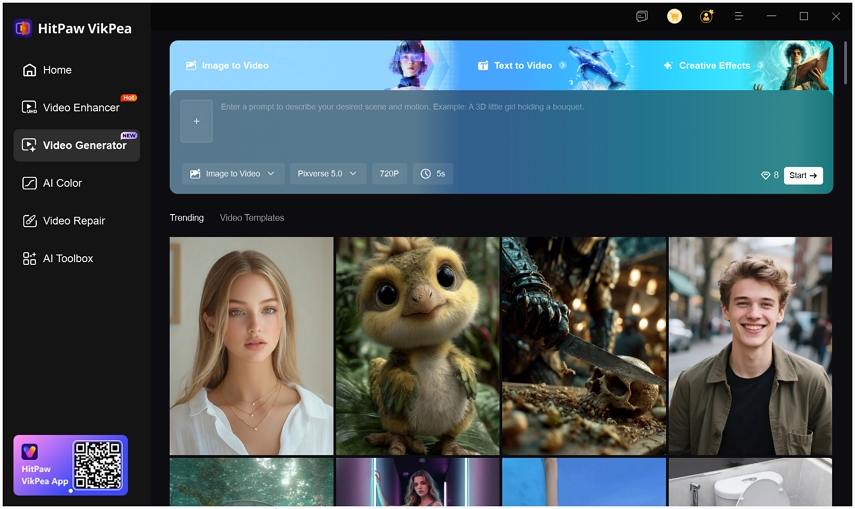
Step 2:Choose between 'Text to Video' and 'Image to Video' options. Enter your idea by typing a detailed prompt or uploading images. Select Text to Video for prompt based creation, or pick Image to Video to import your starting and ending frames.
Step 3:Choose an AI model such as Kling2.1, Kling2.5turbo, Hailuo 2.3, Pixverse 5.0, VEO3, or Seedance1.0 Pro, then adjust settings like duration, resolution, and visual parameters to match your target style.
Step 4:Hit Generate to produce your video. Review the output, download it through the save option, or enhance video to 8K/4K further using the integrated Video Enhancer for an upgraded final result.
FAQs on Waver 1.0 AI Video Generator
Yes, Waver 1.0 is open-source and free for researchers and developers. There is no subscription or payment plan since it's not a commercial product.
Waver 1.0 is primarily intended for research and experimental use rather than commercial production. While it can generate high-quality videos, users should carefully review its licensing terms before applying outputs to commercial projects, as usage rights and future policy changes may affect commercial eligibility.
Waver 1.0 can generate videos at 720p resolution and upscale them to 1080p output quality. Each clip typically lasts between 5 and 10 seconds, making it suitable for short cinematic shots, concept demos, and AI video experiments rather than long-form productions.
Waver 1.0 is best suited for AI researchers, developers, and advanced creators with strong technical skills. It requires GPU resources and prompt-tuning experience, so beginners or users seeking a ready-to-use commercial video tool may find fully packaged AI video platforms more practical.
Conclusion
Waver 1.0 is a cutting-edge AI video generation model capable of producing high-quality, short video clips from text or image prompts. It offers impressive motion modeling, multi-shot storytelling, and various video styles, making it a powerful tool for AI video enthusiasts. However, it is not yet a polished commercial product. Running Waver 1.0 requires a strong GPU setup and careful prompt tuning, and outputs often need post-production refinement to reach broadcast standards. For creators seeking a more user-friendly, ready-to-use solution, a commercial platform like HitPaw VikPea AI Video Generator may be a more appropriate choice.
Leave a Comment
Create your review for HitPaw articles



