






8 Best AI Photo Enhancer Plugins for Photoshop
Photoshop offers powerful editing tools, but enhancing a low-resolution, blurry, noisy, or poorly lit photo can still require multiple manual adjustments. A photo enhancer plugin for Photoshop can simplify this process by adding specialized tools for upscaling, sharpening, noise reduction, color enhancement, and other image-quality improvements. In this guide, we compare 8 of the best photo enhancer plugins for Photoshop in 2026, including AI-powered and specialized tools. We’ll cover their key features, strengths, limitations, pricing, and best use cases to help you choose the right plugin for your workflow.

Part 1. What Can a Photo Enhancer Plugin Do in Photoshop?
A photo enhancer plugin for Photoshop is an add-on that extends Photoshop with specialized tools for improving image quality. Depending on the plugin, it can help upscale low-resolution images, sharpen soft details, reduce noise, improve colors, enhance faces, or restore damaged photos.
Common Uses of Photoshop Photo Enhancer Plugins
- Upscale Low-Resolution Images: Increase image resolution while preserving or reconstructing fine details.
- Sharpen Blurry Photos: Improve soft edges and restore visible details in slightly blurry images.
- Reduce Image Noise: Remove digital noise and grain caused by low-light shooting or high ISO settings.
- Improve Colors and Lighting: Adjust color, contrast, brightness, and overall image appearance.
- Enhance Faces and Portraits: Improve facial details, skin appearance, and portrait quality.
- Restore Old or Damaged Photos: Reduce scratches, noise, fading, and other signs of image deterioration.
Part 2: 8 Best AI Photo Enhancer Plugins for PhotoShop
1. HitPaw FotorPea Plugin - Photo Enhancer Plugin for Photoshop Free Download
HitPaw FotorPea is an innovative AI-powered photo editing software that harnesses the power of artificial intelligence to enhance and retouch images with remarkable precision. One of its standout features is the PhotoShop plugin, which seamlessly integrates with the Adobe Photoshop interface, allowing users to access HitPaw's advanced AI capabilities directly within their familiar editing environment.
If you have a subscription to HitPaw FotorPea, you'll get access to the free Photoshop plugin, providing a seamless integration between the two software.
A wide range of AI-powered tools for photo enhancement
- AI Face Enhancer: Automatically detects and retouches facial features, smoothing skin, brightening eyes, and enhancing overall facial features.
- AI Body Enhancer: Slims and contours body shapes with natural-looking results.
- AI Image Upscaler: Increases image resolution while preserving detail and quality.
- AI Background Remover: Precisely removes backgrounds from images with a single click.
Step-by-step guide to using the HitPaw FotorPea Plugin on Photoshop:
1. First, go to the Adobe Exchange and download the HitPaw FotorPea Plugin. Make sure you install the plugin correctly so it can be detected by Photoshop. Once installed, restart Photoshop to ensure the plugin is fully loaded.
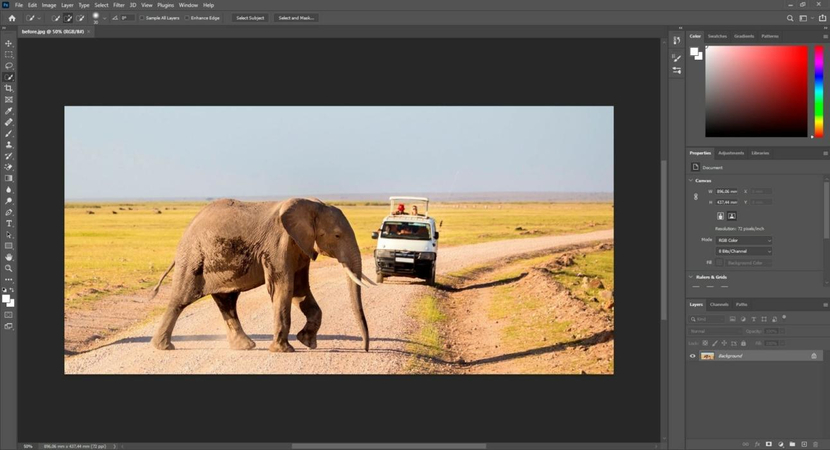
2. Open the Plugin in Photoshop and Enhance Image. New File > Plugins > HitPaw FotorPea Plugin > Choose AI Models
3. Launch Photoshop and open the image you want to enhance. And then from the top menu bar, navigate to Plugins and select HitPaw FotorPea Plugin. Import your image into the plugin interface.
4. Import and Choose the Right AI Model: After imported the image into the plugin interface, you can choose the most suitable AI model based on your image type (such as portraits, landscapes, or low-quality photos).
5. Preview and Save the Enhanced Image




Video Tutorial to Enhance Image to Upload
2. Retouch4Me - Portrait Retouching
Retouch4Me is a specialized plugin designed for professional-grade portrait retouching within Photoshop. Its advanced algorithms analyze and enhance facial features, skin tones, and overall image quality, delivering natural-looking results.
Pros:
- Advanced facial detection and retouching capabilities
- Natural-looking skin smoothing and blemish removal
- Batch processing for efficient workflow
Cons:
- Limited to portrait retouching; not suitable for other image types
- Proprietary algorithms may not suit everyone's preferences
3. Google Nik Collection - Color Correction
The Google Nik Collection is a suite of seven powerful plugins that offer a range of color correction and image enhancement tools for Photoshop users. From precise color adjustments to creative filters and effects, this collection is a go-to choice for professional photographers and photo editors.
Pros:
- Comprehensive suite of color correction and image enhancement tools
- Intuitive user interface and non-destructive editing
- Compatible with various image file formats
Cons:
- Requires additional installation and setup
- Limited updates and support since Google's acquisition
4. Fixel Contrastica 2 - Contrast
Fixel Contrastica 2 is a specialized plugin that focuses on enhancing contrast and tonal range in images. With its advanced algorithms and intuitive controls, this plugin allows users to fine-tune contrast, brightness, and shadow/highlight details with precision.
Pros:
- Precise control over contrast and tonal range
- Advanced algorithms for natural-looking results
- Batch processing capabilities
Cons:
- Limited functionality beyond contrast adjustments
- Relatively steep learning curve for advanced features
5. Neat Image - Noise Reduction
Neat Image is a powerful noise reduction ai photo enhancer plugin for Photoshop that helps eliminate unwanted grain, speckling, and digital noise from images. Whether dealing with low-light conditions or high ISO settings, this plugin can significantly improve image quality and clarity.
Pros:
- Effective noise reduction algorithms
- Batch processing for efficient workflow
- Compatible with various image file formats
Cons:
- Limited functionality beyond noise reduction
- Potential for over-processing and loss of detail if not used carefully
6. Photomatix - Mood Effects
Photomatix is a versatile plugin that specializes in creating mood effects and tone mapping for images. With its advanced algorithms and extensive presets, users can easily add dramatic lighting, stylized looks, and creative effects to their images.
Pros:
- Wide range of creative mood effects and tone mapping presets
- Intuitive user interface and non-destructive editing
- Batch processing capabilities
Cons:
- Limited functionality beyond mood effects and tone mapping
- Potential for over-processing and loss of realism if not used carefully
7. Portraiture - Skin Smoothing
Portraiture is a specialized plugin designed for enhancing and smoothing skin tones in portrait images. With its advanced facial detection and retouching capabilities, this plugin can deliver natural-looking skin smoothing and blemish removal.
Pros:
- Effective skin smoothing and blemish removal algorithms
- Natural-looking results with adjustable settings
- Batch processing capabilities
Cons:
- Limited functionality beyond skin retouching
- Potential for over-smoothing and loss of detail if not used carefully
8. Rays - Light Adder
Rays is a creative plugin that allows users to add realistic and customizable lighting effects to their images. Whether you want to simulate sunrays, lens flares, or dramatic spotlights, this plugin offers a wide range of adjustable settings and presets.
Pros:
- Extensive library of realistic lighting effects and presets
- Intuitive controls for customizing and adjusting lighting effects
- Batch processing capabilities
Cons:
- Limited functionality beyond lighting effects
- Potential for over-processing and loss of realism if not used carefully
Part 3. FAQ of AI Plugin for PhotoShop
Q1. What is the best photo enhancer plugin for Photoshop?
A1. The best photo enhancer plugin for Photoshop depends on your editing needs. For overall image enhancement, HitPaw FotorPea is a strong option, offering tools for AI upscaling, sharpening, noise reduction, face enhancement, and photo restoration. If you need a specialized workflow, other plugins may be better suited for tasks such as portrait retouching, color correction, or noise reduction.
Q2. Is there an AI photo enhancer plugin for Photoshop?
A2. Yes. An AI photo enhancer plugin for Photoshop can use AI models to improve image quality with less manual editing. Depending on the tool, it can upscale low-resolution images, sharpen details, reduce noise, enhance faces, or restore damaged photos. HitPaw FotorPea supports AI-powered enhancement workflows for several of these image-quality tasks.
Q3. Can I upscale a low-resolution image with a Photoshop plugin?
A3. Yes. Some Photoshop plugins use AI upscaling to increase image resolution while reconstructing missing details and reducing artifacts. For example, HitPaw FotorPea can upscale images and enhance details as part of its AI image enhancement workflow. Results vary depending on the original image quality, so starting with the highest-quality source available is recommended.
Conclusion
Having the right tools can make a significant difference in achieving professional-grade results. The top 8 photo enhancer plugins for Photoshop highlighted in this article offer a diverse range of features and capabilities, from AI-powered face and body enhancement to advanced color correction, noise reduction, and creative mood effects.
With the cutting-edge technology and specialized algorithms offered by platforms like HitPaw FotorPea, which is the photo enhancer photoshop plugin, you can take your imagery to new heights, captivating your audience and standing out in a visually-driven world.
 HitPaw Univd (Video Converter)
  HitPaw Photo Object Remover
 HitPaw VikPea (Video Enhancer)


Share this article:
Select the product rating:
Daniel Walker
Editor-in-Chief
This post was written by Editor Daniel Walker whose passion lies in bridging the gap between cutting-edge technology and everyday creativity. The content he created inspires audience to embrace digital tools confidently.
View all ArticlesLeave a Comment
Create your review for HitPaw articles