






Full Guide of I Can Fix That GIF
An actor Dulé Hill who acts as Sam in the 2003 film Holes plays a popular “I can fix that” GIF. In the movie, Sam is a highly intelligent inventor and fixer who assists Stanley. Sam uses his extraordinary skills in inventing and fixing various situations during the movie.
One such example was when he went to Kate's house and saw water coming from the roof. With certainty, Sam points at it and says “I can fix that.”
In this guide, you’ll learn where the “I Can Fix That” GIF comes from, where to download it for free, and how to enhance GIF quality using AI tools like HitPaw VikPea, so your reaction GIFs look sharp, smooth, and share-ready.




Part 1. What Is “I Can Fix That GIF”?
“I can fix that” GIF is a reaction meme which has gone viral on social media platforms including online forums. It consists of an animated image showing Dulé Hill as Sam, his character in Holes dating back to 2003. In the film, Sam often identifies problems and confidently says “I can fix that” signifying confidence on his ability to repair things.

Part 2. Where to Find the “I Can Fix That” GIF for Free
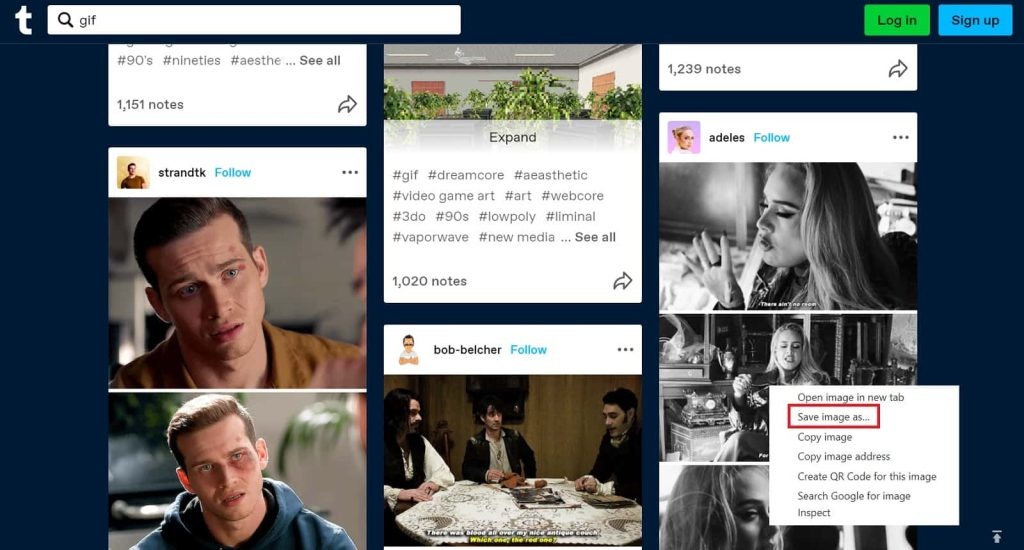
The viral "I can fix it" GIF can be found on several major websites that offer free galleries and tools for uploading, customizing, and sharing animated images. Here's an in-depth look at where to find the popular reaction fixed it GIF:
1. Giphy
With a library containing millions of GIFs, Giphy is likely the most well-known and used source for GIFs on the internet. The site makes it easy to search and discover the latest trending memes and animations. Giphy offers the classic version of the "cant fix stupid" GIF as well as cropped variants focusing just on the defiant pointing gesture. Users can customize the GIFs with options to resize, crop, rotate, and tweak playback speed. Giphy also generates sharing and embedding links so you can easily use the GIF across social media, messaging platforms, and websites.
2. Tenor
As one of the largest GIF platforms, Tenor features an expansive collection of animations including the viral "I can fix that" meme. Tenor's search and discovery functions make finding specific GIFs simple and intuitive. The site also allows uploads for adding new GIFs into the mix. Users can tweak the GIFs with sizing presets and controls over speed. Tenor also generates links for sharing “fix it felix” GIFs directly into social media apps and messages. The platform is integrated into various messaging and keyboard apps as well, putting trending GIFs right at your fingertips.
3. Reddit
On Reddit, the "I can fix that" GIF can be readily found on subreddits like r/reactiongifs where users frequently post it in discussions. Reddit itself doesn't host GIFs, but links often point to Imgur or Gfycat uploads. Reddit's upvote system surfaces the most popular versions of the meme. The platform's commenting structure also makes it easy to reply directly with the fix it Jesus gif.
4. Imgur
As one of the first and largest online image hosting communities, Imgur is a trusted source for meme GIFs. The site is especially popular with Reddit but is widely used across social media. Imgur offers easy uploading and sharing tools to let users spread memes like the "I can fix that" GIF. The hosting service can also convert videos into shareable GIFs. Imgur's community helps surface the most viral animations.
5. Gfycat
Gfycat hosts the classic "I can fix that" GIF and allows converting YouTube clips into short looping GIFs as well. The platform is known for its file compression that enables GIFs to load faster. Custom links make it easy to share Gfycat GIFs across the web and social media. The site also provides options to trim, crop, and resize animations.
6. Tenor GIF Keyboard
Tenor offers a GIF keyboard mobile app that makes finding the popular "I can fix that" meme quick and seamless. The app integrates Tenor's massive GIF database into your phone's keyboard. You can easily search and share GIFs directly into messaging apps without switching between programs. The keyboard provides trending and recommended GIFs too, putting viral memes right at your fingertips.
7. Pexels
For a unique take, Pexels has a cinemagraph version of the GIF with only the pointing motion animated against a still background. This artsy format allows you to incorporate the GIF into social media posts and websites in a visually seamless way. Pexels offers the cinemagraph version for free along with other curated GIFs and images.
Part 3. Pro Tips: How to Enhance a Low-Quality “I Can Fix That” GIF
Many downloaded reaction GIFs look blurry, pixelated, or over-compressed, especially after being reposted across platforms like Reddit, Discord, or messaging apps. This happens because GIFs use aggressive compression and often get resized multiple times, causing visible noise, blur, and loss of detail.
HitPaw VikPea is designed to improve both GIFs and videos. It’s especially effective for reaction GIFs like “I Can Fix That”, where facial expressions, gestures, and motion clarity matter.
Why Choose HitPaw VikPea
- Enhance GIF and video to 4K: Upscale low-resolution GIFs or videos to near-native 4K using AI reconstruction.
- Video to GIF: Import a video, trim the highlighted moment, and export it as a high-quality GIF.
- Remove Noise, Blur, and Compression artifacts:AI models clean up visual noise caused by heavy GIF compression and resizing.
- Multiple AI models for different GIF types: For example, use Denoise Model for grainy or low-light clips. use Portrait Model for face-focused reaction GIFs, and Animation Model for cartoons and animated content.
- Split-screen Preview: Instantly compare the original and enhanced GIF side by side before exporting.
- Batch processing: Enhance multiple GIFs or videos at once to save time.
Steps to Repair Corrupted GIF
Fixing GIFs is not difficult. Here is how you can do it:
Step 1. Import Video or GIF: Launch HitPaw VikPea and import either a low-quality GIF or a source video to Video Enhancer module.
Step 2. Trim Video as GIF (Optional): If you import a video, use the timeline editor to trim the exact moment you want to turn into a GIF, such as the “I can fix that” scene.
Step 3. Select an AI Model: Choose an AI enhancement model based on your content type. For reaction GIFs, the Portrait or Denoise model usually delivers the best results.
Step 4. Adjust Output Settings: Set the output format to GIF, and you can customize the resolution, resolution and bit rate.
Step 5. Preview and Export: Use the split-screen preview to compare before and after results. Once satisfied, export the enhanced GIF and share it anywhere.
Learn More about HitPaw VikPea
Part 4. FAQs of Fix GIF
Q1. Who says I can fix that in Holes?
A1. In Holes (2003), the line I can fix that is said by Sam, a character portrayed by Dulé Hill. Sam is depicted as an intelligent and skilled fixer who confidently offers solutions whenever he notices a problem. This repeated line became iconic and later inspired the popular reaction GIF used online today.
Q2. What does GIF really stand for?
A2. GIF stands for Graphics Interchange Format, an image format that supports short animations and looping image sequences without sound.
Q3. Who invented the GIF?
A3. The GIF format was invented in 1987 by Steve Wilhite at CompuServe as a compressed image format suitable for early internet use.
Conclusion
GIFs are highly regarded to be one of the most popular and commonly used image format for reaction memes and short looping animations. Occasionally corrupted GIFs can be fixed as there are a number of troubleshooting tips and tools eg HitPaw VikPea that can be employed. Thus, you will continue enjoying these enjoyable audiovisual clips.
 HitPaw Univd (Video Converter)
 HitPaw VoicePea
  HitPaw FotorPea


Share this article:
Select the product rating:
Daniel Walker
Editor-in-Chief
This post was written by Editor Daniel Walker whose passion lies in bridging the gap between cutting-edge technology and everyday creativity. The content he created inspires the audience to embrace digital tools confidently.
View all ArticlesLeave a Comment
Create your review for HitPaw articles