






AI Face Emoji Remover That Fixes Face Emojis Naturally
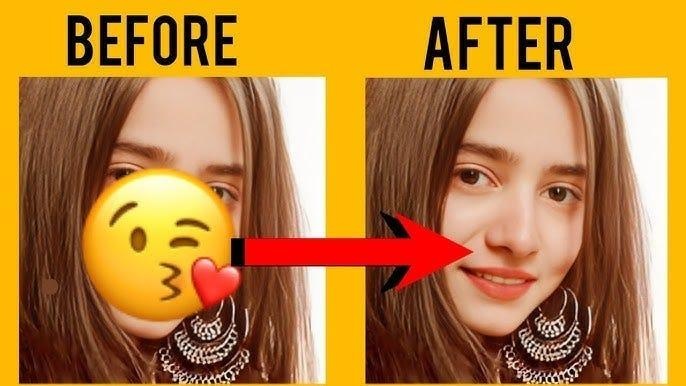
Sometimes, people add face emojis to protect privacy or add humor; however, you may wish you could see the original picture as it was meant to be. Removing emojis is not just about aesthetics; it is about reclaiming the essence of the photo, whatever the reason it is.
The good news is that advanced tools like HitPaw FotorPea make this process easier than ever. In this article, we'll introduce you to the best face emoji remover technology to help you eliminate the emoji and revive the moment again.

Part 1. Why AI Removes Face Emojis More Effectively
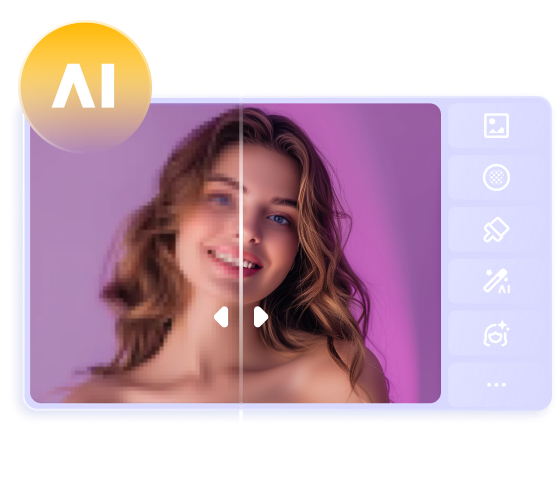
Most AI Face Emoji Removers rely on deep learning models such as convolutional neural networks (CNNs) and image inpainting algorithms. AI models are trained to recognize emojis based on shape, color contrast, and placement on facial regions. Through computer vision and semantic segmentation, the system can accurately detect face emojis and separate the object from real facial features.
Compared with traditional editing tools, an AI Face Emoji Remover works on a deeper technical level instead of simply covering or blending pixels. Traditional tools like content-aware fill copy nearby pixels to cover emojis, which often results in blur or distortion on faces. By understanding facial context rather than isolated pixels, AI-based emoji removal reconstructs missing details instead of duplicating pixels, producing more natural and consistent results.
This makes AI especially effective when emojis cover eyes, mouths, or other critical facial features.
Limitations of Traditional Face Emoji Remover
Traditional photo editing tools offer powerful features but have so many limitations that it can be quite a task for beginners. One major drawback is manual editing, which takes hours and hours, and one error while editing can cause you to lose all your hard work in a blink.
Additionally, tasks like “how to remove emojis from face” can be challenging, as traditional tools don't have AI features that automatically detect objects and remove them. These factors make traditional tools more challenging and less convenient than the HitPaw FotorPea tool, a more user-friendly alternative.
Part 2. How to Remove Emoji From Face Using HitPaw FotorPea
As you know why it is necessary to remove emojis from pictures and the limitations of traditional editing tools, you might be looking for a reliable tool. In this case, HitPaw FotorPea is a face emoji remover designed to remove objects like emojis or text from photos. Using its batch editing tool, you can easily get rid of emojis or any other object from more than one Image simultaneously.
Additionally, the compare feature lets you see before and after the photo, so you get a glimpse of the result and know where you need to improve your editing. You can erase the mistakenly highlighted part using its eraser feature, making it one of the best face emoji removers online.


Features of HitPaw FotorPea
- Recover facial details naturally by restoring eyes, nose, and skin areas covered by emojis.
- Use AI face models trained for portraits to rebuild realistic facial structure and expressions.
- Enhance low-resolution photos so restored facial areas blend smoothly with the original image.
- Handle different emoji sizes and positions, including eyes, mouth, and full-face overlays.
- Upscale images up to 2K/4K/8K after emoji removal for clearer and sharper results.
- Avoid manual retouching or cloning to make the process faster and beginner-friendly.
- Process multiple images in batches, ideal for creators or large photo collections.
Simple Guide to Remove Emojis from Photos with HitPaw FotorPea
Now you know about the advanced tool HitPaw FotorPea, let's move straight to a step-by-step guide to learn how to remove emojis from the face using this tool. By following these steps, you can easily remove emojis from your pictures.




Step 1. Launch the HitPaw FotorPea on your device and navigate to the "Tool Box" tool.
Step 2. Then, hit the "Object Remover" button and import the picture from which you want to remove emojis.
Step 3. After that, click the "Brush" tool and highlight the emoji you want to cut. Now, tap the "Preview" button to see whether the emoji is removed.
Step 4. Now check the final result and then hit the “Export” button to download the final picture without emoji.
Pro Tips for Effortlessly Removing Face Emoji in Photos
Now that you know the step-by-step guidelines on how to remove emojis from your face, here are some tips to get the perfect emoji-free picture.
1. Zoom in on the areas with emojis to highlight the part precisely, which will help you replicate the texture and color hidden under the emoji.
2. After removing the emoji, make sure to balance the lighting and shadow on affected areas and blend it naturally with the rest of the Image.
3. Adjust the brush size and softness when using the clone stamp or healing brush to blend the edited area smoothly with the rest of the picture.
4. If the big emoji covers the face, choose the color picker to even out and match around the skin.
Part 3. Other Useful Features of HitPaw FotorPea for Image Editing
In addition to removing emojis from photos, HitPaw FotorPea is equipped with a range of powerful and useful features. Here are some of the standout features that are necessary for editing a picture.
1. AI Background Remover
It offers an advanced AI-powered background removal feature, making it easy to isolate the main subject of the photo effortlessly. It is particularly useful for creators to separate the subject from the background, even in complex images with solid colors or scenic backgrounds.
2. AI Scratch Repair
You get the ability to remove scratches from old photos with the help of this tool. After saving the digital version of the old photo, you can restore its missing elements to preserve memories.
3. Batch Processing
One of the standout features of this tool is its ability to perform batch processing that enables users to edit multiple pictures simultaneously. Moreover, this feature is a huge time saver, especially for those working on large collections of images, such as photographers or social media managers.
4. AI Enhance Model
This technology can identify and correct imperfections like blurriness and low resolution and restore clarity with minimal user input. Furthermore, by understanding the elements of photos, such as faces, backgrounds, or objects, AI models make precise adjustments to enhance the color, sharpness, and overall quality of the picture.
These advanced features greatly support the process as the AI background remover helps refine the emoji by refiling the gaps left in pictures after the emoji is removed. The batch process feature saves time by eliminating emojis from multiple photos. Additionally, the AI enhancement model corrects imperfections after the emojis are removed from pictures. Overall, all these features make the emoji removal process easy and efficient while enhancing the quality of photos.
Part 4. Comparing HitPaw FotorPea With Other Emoji Remover Tools
After looking at this tool's powerful features, it clearly stands out as the best face emoji remover from other options available. Here is how HitPaw FotorPea is a game changer when it comes to effortlessly removing emojis from the face in photos.
1. Seamless Emoji Removal: Unlike other tools that destroy the pixels of pictures while editing, this tool ensures that the photo quality remains unchanged throughout the editing process.
2. Affordable and Easy to Use: It's an affordable and simple tool, making it beneficial for beginners who are just learning to edit and don't want to spend as much as most tools usually demand.
3. Multi-Object Removal: This is not only limited to emoji remover. It can also remove unwanted objects like watermarks from your photos, offering more flexibility than other tools.
4. Advanced AI Results: The advanced AI tool identifies the context of the Image, like texture, colors, and shadow, to blend it seamlessly and ensures the final Image looks flawless.
Part 5. FAQs About Face Emoji Remover
Q1. How can I remove an emoji from a picture online for free?
A1. Many online tools claim to remove emojis for free, but most of them compress images or add watermarks to the final result. For cleaner and more natural results, desktop AI tools like HitPaw FotorPea provide more accurate emoji removal and better detail recovery. You can preview the result before exporting the image in high quality.
Q2. Does an AI emoji remover really work?
A2. Yes. AI emoji removers can work very well, especially when they are trained to understand facial structure and background textures. Advanced AI tools don’t simply erase the emoji area — they intelligently reconstruct missing details for more realistic results.
Q3. How can I erase emojis or stickers from a photo without losing image quality?
A3. To avoid quality loss, it’s important to use an AI tool that supports high-resolution image processing. Basic erasers often blur the area or damage facial details. Tools like HitPaw FotorPea help remove emojis or stickers while preserving skin texture and overall image clarity.
Q4. How can I get rid of face emojis on iPhone or Android?
A4. You can remove face emojis on iPhone or Android by using the HitPaw FotorPea mobile app. It is designed for quick and simple emoji removal, allowing users to clean up photos directly on their phones without complex editing steps.
Conclusion
In conclusion, this article has given you the top features of HitPaw FotorPea and guidelines on how to remove emojis from faces in pictures. It is a perfect choice for those seeking fast face emoji remover as its advanced AI-powered tools effortlessly maintain the quality of the picture. Moreover, removing emojis from images doesn't require editing skills, so you can still use it even if you are a beginner.
 HitPaw Edimakor
 HitPaw VikPea (Video Enhancer)
 HitPaw Univd (Video Converter)



Share this article:
Select the product rating:
Daniel Walker
Editor-in-Chief
This post was written by Editor Daniel Walker whose passion lies in bridging the gap between cutting-edge technology and everyday creativity. The content he created inspires the audience to embrace digital tools confidently.
View all ArticlesLeave a Comment
Create your review for HitPaw articles