




HitPaw FotorPea V5.7.0 Unveils Pro Look for Better-Composed Photos, Natural Facial Beauty, and HD Restoration
NEW YORK, N.Y., Sep. 23, 2026 - HitPaw, a leading provider of AI-powered creative tools, today announced the release of HitPaw FotorPea V5.7.0, featuring Pro Look, a new AI Recompose tool that automatically refines photo composition for more balanced, professional-looking results. This update also adds Beautify for one-click facial enhancement and updates some key AI models, making it easier for users to bring out the best in everyday photos with greater speed and precision.
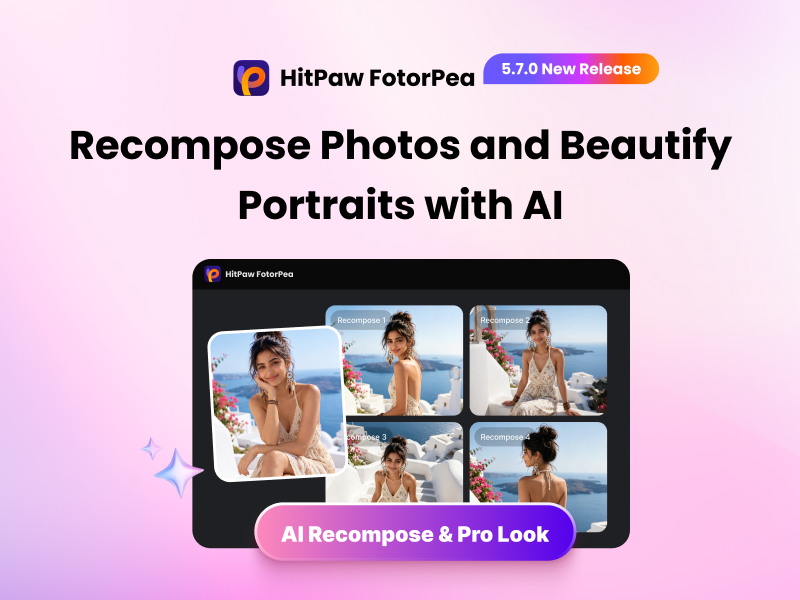
What's New in FotorPea V5.7.0
1. Pro Look with AI Recompose
HitPaw FotorPea introduces Pro Look, powered by AI Recompose, to intelligently recognize subject placement, framing, and aspect ratio. It automatically improves composition, adjusts the subject’s position, and gives photos a more professional look.
Key Benefits: One click is all it takes to create a professionally recomposed photo—no advanced editing skills needed. New users can try it free up to 5 times to preview the results.
Best For: Reframing self-portraits, improving photo composition, and creating more professional-looking social media visuals.
2. One-Click Beautify for Natural Portraits
The new Beautify feature enhances portraits with one click, improving skin texture and complexion while preserving natural facial features and details. Choose styles like Cinematic and Silky for a fresh, polished look without over-retouching.
Key Benefits: Smooth minor imperfections, improve skin tone, and enhance portraits while keeping your natural features intact.
Best For: Enhancing selfies, profile pictures, beauty portraits, and polished social media photos while keeping a natural look.
3. HD Output for Photo Restoration
FotorPea V5.7.0 helps bring more clarity to restored photos. Turn on HD Enhancement to repair image details while increasing resolution for sharper faces, clearer textures, and output of up to 4K.
Key Benefits: Restore old photos with clearer, more detailed results, even when repairing large images with small or distant faces.
Best For: Restoring old family photos, improving small or low-resolution portraits, and creating clearer images for printing or sharing.
4. Smarter Auto Portrait Model
The upgraded Auto Portrait model improves facial clarity, texture, and similarity across different image sizes and complex scenes. It reduces large color blocks and artificial-looking faces, helping small or distant faces appear more natural and refined.
Key Benefits: Bring blurry faces back to life while keeping them clear, recognizable, and true to the original.
Best For: Enhancing blurry portraits, group photos, and images with small or distant faces while preserving facial identity.
5. Next-Level AI Realism
AI-enhanced photos can sometimes look overly artificial or lose fine facial details. FotorPea V5.7.0 improves facial consistency, clarity, and texture while reducing visible AI-generated artifacts for more natural-looking results. It also adds 1X, 2X, 3X, and 4X super-resolution options for flexible enhancement.
Key Benefits: Adjust enhancement strength to achieve more realistic textures, clearer details, and a more natural overall look.
Best For: Improving AI-enhanced portraits, creative visuals, and photos that need more natural textures, facial details, and realistic results.
6. One-Click Preview for Multiple Results
Quickly preview and compare multiple enhancement results in one place. This makes it easier to explore different outputs and choose the version that best matches your needs.
Key Benefits: Compare enhancement results more conveniently and select your preferred look with less effort.
Best For: Comparing different enhancement results, exploring creative variations, and quickly selecting the preferred version of a photo.
7. Flexible DPI Export for High-Quality Printing
FotorPea now supports 400 DPI and 600 DPI export options, making it easier to prepare images for photo printing, design projects, and other high-resolution output needs.
Key Benefits: Export enhanced images with greater control over resolution for clearer, more detailed printed results.
Best For: Preparing photos for printing, photo albums, design projects, and other high-resolution creative work.
Compatibility and Pricing
HitPaw FotorPea is compatible with Windows 11/10/8/7 (64-bit) and macOS 10.15 and above. Pricing starts at $22.39/Month for Windows and $25.59/Month for Mac.
As part of its Autumn Sale, HitPaw is offering up to 50% off Yearly and Lifetime plans for a limited time:
ABOUT HITPAW
HitPaw develops AI-powered solutions for photo, video, and audio creation. With advanced technology and easy-to-use tools, HitPaw helps creators enhance their content, streamline creative workflows, and bring their ideas to life.
Learn more at: About HitPaw - All Things About HitPaw
Follow Us
- YouTube: https://www.youtube.com/@hitpaw
- X (Twitter): https://x.com/HitPawofficial
- Instagram: https://www.instagram.com/hitpawofficial/
- Pinterest: https://www.pinterest.com/HitPawofficialwebsite
