






Top 5 Tools to Upscale Your PNG Images Instantly
 By Daniel Walker
PNG files have great acceptance in design and online business. We see them on logos, product cut-outs, app icons, stickers, and website banners. PNG files are preferred because you can easily export them with a clean edge quality and with no background. Higher-quality screens with 2k, 4k and 8k resolution show small original PNGs pixelated and fuzzy. A good PNG upscaler can add density and detail without jagged edges.
These days, a variety of tools use AI for pixel restoration and smart resizing. Some tools work right from your browser, while others are downloadable desktop apps that offer more functionality and work offline. In this article, we will discover five 4K PNG upscaler tools to achieve the best results for work, print, and social media.
Quick Comparison Table of PNG Upscaler
| Tool Name | Max Upscaling | Keep Transparency | AI Models | Batch Processing | Free Version | Platform |
|---|---|---|---|---|---|---|
| HitPaw FotorPea | 2x / 4x / 8x | Yes | 13 AI Enhance Models | Yes | Yes (trial & online version) | Windows / Mac / Mobile / Online |
| Img.Upscaler | 2x / 4x | Yes | Limited | Yes (limited batch) | Yes | Online |
| Pixelbin | 2x / 4x / 8x | Yes | Single AI Model | Yes | Yes (limited) | Online |
| Artguru AI | 2K / 4K / 8K | Yes | Limited | No | Yes (credit-based) | Online |
| BigJPG | 2x / 4x / 16x | Yes | Anime / Photo Models | Yes | Yes (size-limited) | Online / Desktop |
5 Best PNG Upscalers to Upscale High-Quality (Online& Offline)
If you're resizing a PNG for a client, an online store or a website in general, there are usually three things you want: sharp edges, natural texture and clean transparency. Below are some well-known ai upscale PNG tools that are easy to use, provide good results and support PNG output. Always, test with one image first, because results may vary depending on the original quality.
1. HitPaw FotorPea: AI 4K PNG Upscaler
HitPaw FotorPea is an AI 4K PNG upscaler that ensures to increase the size of PNG images while keeping the quality of clarity and transparency. It helps upscale PNG without losing quality, missing detail reconstruction, edge sharpening, and reduction of blurriness. This software is most suitable for logos, product images, user interface (UI) elements, and graphics that need to be clear and sharp across large and professional display screens.
Key features of HitPaw FotorPea
- AI-driven 4K PNG upscaling: Enlarges PNG files to 4K, maintaining the sharp edges and details.
- Smart detail reconstruction: Smartly rebuilds missing pixels without stretching the original image.
- Clean transparency handling: Effectively keeps the background intact, best for logos, cutouts, and layered designs.
- Texture-aware enhancement: Enhances the appearance of fabric, shapes, shadows, outlines, and more.
- Blur and softness correction: Fix the motion blur and focus problems of low-resolution PNG files.
- Noise and artifact reduction: Removes compression artifacts, pixel noise, and keeps textures original.
- Available Platforms: Enhanced PNGs locally on macOS and Windows for improved privacy and stability.
- Simple preview and export workflow: Users can compare the results and export PNGs in higher quality.




How to upscale image using HitPaw FotorPea
Step 1.Launch HitPaw FotorPea and click on "Enhance Now".

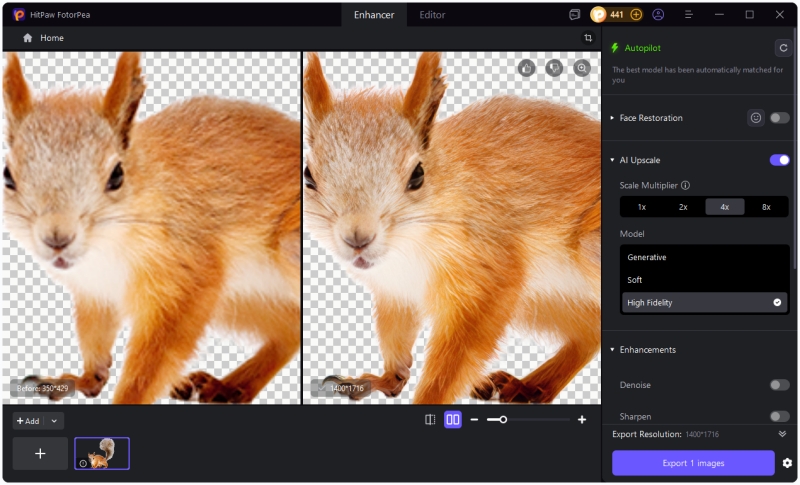
Step 2.Upload the PNG you want to upscale, then toggle the "AI Upscale" option to turn it on. Select a scale multiplier ("1×, 2×, 3×, 4×, or 8×") and choose the "AI Model".
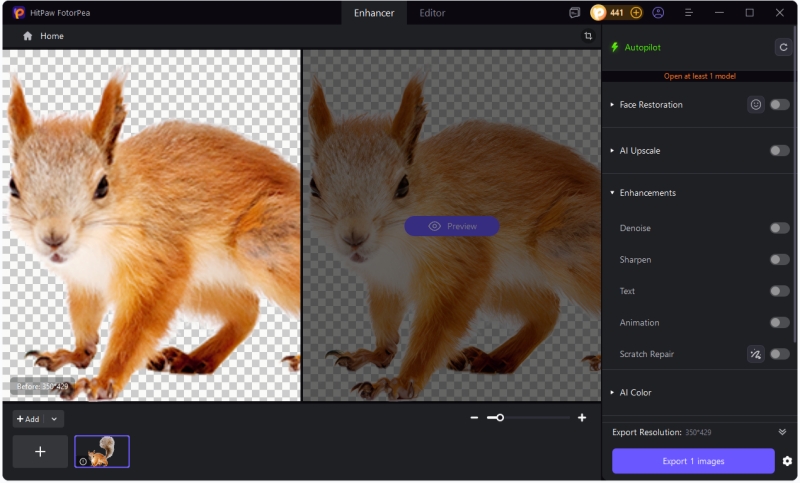
Step 3.Click on Preview to apply the changes, and then export the upscaled image if you are satisfied with the result.


2. Img.Upscaler: Smart PNG Upscaling
Img.Upscaler is an online AI tool with the best speed and simplicity features. It upscales PNG files using super-resolution technology. It keeps edges smooth and details clear during resizing. A browser-based workflow is provided for design updates, website assets, and graphics tasks without downloading any software.
 Pros
Pros
- Provides 200% and 400% PNG enlargement with clear results.
- Drag-and-drop upload makes the tool fast and easy.
- Supports small batch PNG upscaling for quick tasks.
- Includes basic editing tools for simple image adjustments.
- Allows commercial use of enhanced PNG images freely.
 Cons
Cons
- Batch size limits reduce efficiency for large image projects.
- Advanced AI customization options are not available.
- Requires a stable internet connection for all processing tasks.
3. Pixelbin: Professional PNG Upscaler
Pixelbin is a platform for AI-powered professional image enhancements. It is best suited for people who need reliable PNG upscaling. It is designed for teams and creators who want to upscale PNGs in bulk. It centers on clarity with detail protection and workflows for efficiency in upscaling images for e-commerce, marketing, and high-volume design projects.
Pros
- Upscales PNG images up to 8× with reliable clarity.
- Uses AI models trained specifically for detail preservation.
- Offers automation options suitable for large image workflows.
- Processes images securely with encrypted handling.
- Supports a wide range of modern image formats.
Cons
- Premium features are locked behind paid plans.
- Not ideal for quick, one-off image edits.
- Learning curve exists for non-technical users.
4. Artguru AI: Upscaling High Resolution for PNG
Artguru AI is a browser-based AI image upscaler PNG tool used to enhance PNGs and upscale them to high resolutions with no hassle. Its primary function is to upscale images to contemporary display specifications, offering clear enhancement targets for 2K, 4K, and 8K resolutions. It analyzes and enhances images automatically, suitable for logos, digital artwork or business graphics.
Pros
- Upscales PNG images to high resolutions with a single click.
- Offers clear resolution selection without manual technical adjustments.
- Enhances clarity and sharpness while reducing visible noise.
- Supports batch processing to handle multiple images efficiently.
- Ensures images are processed privately and securely online.
Cons
- Free access is limited by usage or resolution caps.
- Premium resolutions require additional credits or a subscription.
- Performance depends on the internet connection speed.
5. BigJPG: Free Online PNG Enhancer
BigJPG is a free upscale PNG tool specifically meant to upscale PNGs, emphasizing smooth lines and stable colors. It uses specialized deep neural networks that work on line art and flat regions of color. Because of this, BigJPG is frequently chosen for illustrations, icons, and graphic-style PNG files where clean edges are more important than heavy texture detail.
Pros
- Uses deep neural networks optimized for line and color preservation.
- Delivers clean results with minimal glittering or edge doubling.
- Supports browser-based use without requiring software installation.
- Provides clear progress estimation during image enlargement.
- Automatically removes stored images after a short retention period.
Cons
- Free users face strict limits on image resolution and file size.
- Enlargement may fail during high server traffic periods.
- Photographic PNG images may show limited texture improvement.
FAQs
Yes, most PNG upscaling tools also support JPG images. Tools like HitPaw FotorPea can enhance JPG photos by improving sharpness, clarity, and resolution using the same AI workflow.
In general, yes, if you download or export it as a PNG, but you must confirm the output settings, as some of these tools will default to JPG if you don't select PNG.
Yes, HitPaw Photo Enhancer Online is a free one-click PNG upscaling tool. You just have to upload a PNG, it will enhance up to 4K directly in your browser without any software installation.
Conclusion
A great PNG upscaler is able to relieve a user of many hours of tedious redesigning, especially in situations where there are strict requirements for sharp edges, clear text, and transparency for branding. For quick jobs, online tools are very handy, but for more consistent quality and privacy, desktop tools are recommended.
For a reliable upscaler, HitPaw FotorPea is a very solid choice. This is especially helpful when the user needs to upscale a PNG with a transparent background for business, product imagery, and design assets.
Leave a Comment
Create your review for HitPaw articles



