






8 Best AI Image Generators Without Restrictions in 2026
Uploading or generating images with AI should be fun and flexible — not limited by watermarks, daily caps, or restricted editing features. Many AI image generators still come with these practical limitations.
This guide compares the best AI tools with fewer restrictions, including support for image generation, image-to-image editing, flexible prompts, and higher free usage limits, helping you choose the right option for your needs.
Part 1. What Is a No-Restriction AI Image Generator
A no-restriction AI image generator is an image creation tool designed to remove common usage barriers—such as mandatory account registration, visible watermarks, or locked core features—so users can explore ideas and generate images more freely and efficiently.
In this context, “no restriction” does not imply the absence of standards or oversight. Rather, it refers to fewer technical and access limitations, while creative outcomes are still shaped by how users choose to interact with the tool. Users are encouraged to apply AI image generators thoughtfully, selecting appropriate inputs and respecting general content. The images generated depend on factors such as the photos uploaded, the prompts or styles selected, and the creative direction set by the user.
In simple terms, a no-restriction AI image generator emphasizes creative flexibility and ease of use, while relying on users’ choices and intentions to guide the final output—supporting imaginative expression without unnecessary barriers. Here’s a structured breakdown of its main features:
1. No Sign-up Required: Users can start creating images immediately without mandatory account registration, streamlining access and reducing entry friction.
2. No Watermarks: With this unlimited AI image generator tool, generated images are free from visible watermarks, allowing creators to use or share content without additional editing steps.
3. No Daily Limits: There are no restrictions on the number of images that can be generated per day, giving users continuous creative freedom.
4. Freedom to Content Style: Users can fully control the creative direction, selecting prompts, styles, and inputs that match their vision.
5. Free Access: The tool is available without payment, providing an easy way for anyone to experiment with AI-generated imagery.
Part 2. Top 8 Unrestricted AI Image Generators (Online & Offline)
1. HitPaw FotorPea:Best AI Image Generator with No Restrictions
Regardless of the type of images you want to create, HitPaw FotorPea is built for limitless creative exploration. It enables users to transform ideas into visuals with remarkable speed and flexibility, no matter surreal cosmic landscapes, futuristic cities, and other creative design. HitPaw FotorPea brings the imaginative concepts to life efficiently without unnecessary waiting time, while maintaining consistently high-quality output based on your chosen inputs and styles, making it a practical choice for creators looking for an AI image generator without restrictions.
In addition to its intuitive interface, HitPaw FotorPea is a reliable tool that allows users to generate multiple images simultaneously without watermarks, making it ideal for flexible and uninterrupted creative workflows.
Moreover, it supports multiple image formats, enabling users to upload photos in different file types. By fine-tuning prompts, styles, and creative settings, users can further refine their results to match their expectations.
Features
- AI image generator that allows you to effortlessly produce graphics without any limitations
- Generates a high-quality image without watermark
- Explores the multiple styles and designs with 12 AI generation models
- Allows you to create multiple genres of images quickly
- A vast library of templates with helpful prompts for quick design
- Compatible with Mac and Windows
- Brings in a simple user interface




For users looking for a lightweight, web-based option, HitPaw Online AI Photo Generator is a perfect complement. It allows quick AI image creation directly in your browser, with features such as:
- Fast AI image generation - turn prompts into visuals instantly.
- Background editing - remove or replace backgrounds with a few clicks.
- Creative style transfer - apply artistic effects to images quickly.
- Beginner-friendly interface - ideal for rapid experimentation or casual projects.
- Whether you need a powerful desktop-level editor or a fast online generator, HitPaw offers solutions for every creative scenario.
How to Generate Images to Images AI with No Restrictions
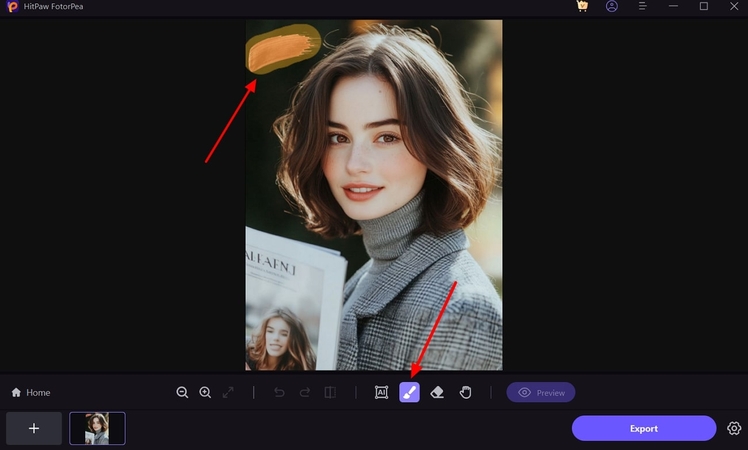
Step 1: To begin the software download, visit the official HitPaw FotorPea website and select the "Download" icon. You should launch HitPaw FotorPea after installing it on your PC and then click the AI Generator option. You can now access the "Type What you want to See" button by hitting the Generate AI Images button.

Step 2: In this phase, you'll need to enter the text description about what kind of ai generated photos you're willing to create. By uploading the photos to the HitPaw FotorPea timeline, you can add beautiful effects and filters to the images in addition to creating them with text descriptions.
Step 3: After choosing the image size and resolution, you'll need to press the Generate button to start generating the AI-powered images on the computer. HitPaw FotorPea only tasks for a few moments before generating the images, and then you'll be able to preview the image credentials.
After you are satisfied with the generated images, you can select the Download button to export them to the computer.
2. Gcore
Gcore is an appropriate AI image generator no restrictions tool that allows you to create multiple types of images quickly. Since this tool is web-based, you don't have to install any software to access the multiple types of images.
Features
- It allows you to create artistic visuals and photo-realistic
- Enables you to enhance the images effortlessly
- Brings in a simple user interface
- No image quality loss detected
 Pros
Pros
- No installation required
- Export the images in various photo formats
- Quick image generation algorithm
 Cons
Cons
- Could be expensive
Available Platforms: Web Based
Price: $15/month
3. Perchance
Another exciting free AI image generator without restrictions tool you can watch out for is Perchance. It offers an attractive user interface, and only inputting the required text descriptions will be enough to create high-quality images of all the genres.
Features
- Doesn't ask for installation
- Create the images through AI powered technology
- Supports multiple image formats
- Explore the various image customizations
Pros
- Easy to use
- Offers the free version
- Select from the multiple styles and designs
Cons
- Asks for a fast internet connection
Available Platforms: Web Based
Price: Free
4. Venice.AI
Venice.AI is another reliable unrestricted AI image generator that doesn't take any time to create AI-powered images. From allowing you to create images through text description to help you to apply tons of styles to the images, Venice.AI has got all the basics covered.
Features
- Brings in the preloaded templates and styles
- Create realistic outputs quickly
- No image quality loss detected
Pros
- Create stunning images without limitations
- No watermark detected
- Easy to use
Cons
- The free version is limited
Available Platforms: Windows, MacOS, and Web
Price: $25/month
5. Magic Studio
Magic Studio is coupled with various types of terrific image styles, and the professional user interface of this tool will ensure that you can create highly customized images. Upon entering the timeline, all you need to do is enter the text description of what you want to create using this AI text-to-image generator with no restrictions.
Features
- Brings in the advanced prompt customization
- Offers artistic and realistic styles
- Explore the export options
Pros
- Offers a simple user interface
- Comes up with the high-speed rendering
- Explore the customization features
Cons
- Offers limited offline features
Available Platforms: Android, iOS, macOS, Windows and Web
Price: $12.99/month
6. Anakin.AI
There are a lot of tools to create images without restrictions, and going for the Ankin.AI won't be a bad gig. It offers a simple user interface, and while generating the images, you can select from the various styles and templates.
Features
- Explore the brilliant image templates
- Customize the generated images
- Offers various visual styles
Pros
- Brings in detailed images
- Easy to use
- No image quality loss detected
Cons
- Expensive
Available Platforms: Linux, Windows and Web
Price: $30/month
7. Canva
Canva offers a mixture of image editing and image generation and sits well for professionals and hobbyists. With this tool, you can use it as an AI image editor no restrictions to create various images, applying multiple types of prolific image styles.
Features
- Comes up with brilliant image editing tools
- Compatible with multiple resolutions and formats
- Easy to use
Pros
- Offers the affordable premium package
- Beginner friendly
- No image quality loss detected
Cons
- Unwanted ads could come up
Available Platforms: Web Based
Price: $12.95/month
8. Raphael AI
Raphael is a powerful and intuitive free AI image generator with no restrictions, allowing users to create stunning visuals effortlessly. With its user-friendly interface and advanced AI capabilities, you can turn any text description into a unique image in seconds.
Features
- Brings in the team collaboration supports
- Allows you to create the images with no limitations
- Exports the images in several image formats
Pros
- No installation
- No watermark detected
- User-Friendly Interface
- Zero data retention policy
Cons
- Limited AI models
- Multiple image generation is not supported
Available Platforms: Windows, Mac, Web-based, Online
Price: $20/month
Part 3. Comparison Table of AI Image Generator No Restrictions
| Tool | Best for | Strengths | Weaknesses |
|---|---|---|---|
| HitPaw FotorPea |
|
|
|
| Gcore |
|
|
|
| Perchance |
|
|
|
| Venice.AI |
|
|
|
| Magic Studio |
|
|
|
| Anakin.AI |
|
|
|
| Canva |
|
|
|
| Raphael AI |
|
|
|
Part 4: Things to Consider Before Using AI Image Generators No Restrictions
While an AI image generator with no restrictions offers creative freedom, users should be aware of potential risks and responsibilities:
Copyright & Ownership: Images generated may involve elements from copyrighted sources. Verify usage rights before publishing or commercial use.
Commercial Use Authorization: Not all AI-generated content is automatically cleared for commercial purposes. Check licensing policies.
Data Privacy: Be cautious with sensitive or personal information when uploading images or prompts.
Content Compliance: Ensure generated content follows legal and ethical standards; avoid prohibited or harmful material.
In short, even with a no-restriction AI image generator, responsible use ensures both creative freedom and legal safety.
Part 5. FAQs about AI Image Generators with No Restriction
Q1. Is there a free and unlimited AI image generator?
A1. Yes, while there are many unlimited AI image generators available today, some of them offer free and unlimited use, like Raphael AI. Its FLUX.1-Dev model lets you create high-quality images from text online, with no sign-up required.
Q2. Are unrestricted AI image generators safe to use?
A2. Yes, most of AI image generators with no restrictions are safe to use and do not store your personal data. However, you are fully responsible for the content you generate—use it legally and responsibly.
Q3. Which AI tool can generate images without restrictions?
A3. If you want an AI tool that generates images freely, try HitPaw FotorPea. It has no limits, no watermarks, and lets you create photorealistic or abstract images using models like Seedream and Nano Banana Pro.
Q4. Can I use the generated images for commercial use?
A4. Yes, you can use AI-generated images for commercial purposes in most cases, but it depends on the platform and licensing terms.
Q5. Are there any AI art generators with no restrictions?
A5. Some AI image generators focus on fewer usage limitations for AI art, allowing users to create images freely without common barriers like watermarks or locked core features. HitPaw FotorPea is one such option, offering flexible AI image generation driven by user-selected inputs and creative settings. Additionally, creators have access to focus on unlimited creativity with its strong emphasis on user privacy and data protection.
Q6. Who is responsible for the content generated using the AI image generator?
A6. Users are solely responsible for the content they generate, upload, modify, and distribute using the AI image generator. Users must ensure that their content complies with all applicable laws, does not infringe any third-party rights, and does not involve minors or illegal activities. The platform does not review or endorse user-generated content and assumes no liability for its use.
Conclusion
It's hard to find any reliable AI image generator with no restrictions on the internet but this guide has listed the 8 top-notch ways to create AI-generated images without restrictions. Regardless of which type of image generation you choose, the tools listed in this guide will surely be useful.
Of all the options given in this guide, HitPaw FotorPea is the best way to generate images without restrictions. It offers a user-friendly interface and generates images with mind-blowing image quality.
 HitPaw Edimakor
 HitPaw VikPea (Video Enhancer)
 HitPaw Univd (Video Converter)

Share this article:
Select the product rating:
Daniel Walker
Editor-in-Chief
This post was written by Editor Daniel Walker whose passion lies in bridging the gap between cutting-edge technology and everyday creativity. The content he created inspires the audience to embrace digital tools confidently.
View all ArticlesLeave a Comment
Create your review for HitPaw articles