






Explore the Top 6 Undress AI Tools for Creative Use
(This page discusses AI undress tools for informational purposes only. The content is intended for adults and does not provide or promote any actual download or usage of such services.)
The arrival of the AI images generation technology has helped the users to explore the new ideas, and pranking others by creating and customizing the images is one of the most popular.
For instance, if you want to prank your girlfriend, you can use the undress AI tool to customize the outfit your girlfriend is wearing in an image. Before going for the AI undress app or an online website you must ensure that you aren't using it to accuse someone, as it could have serious legal consequences. Tune into post to access the 6 remarkable AI undress tools listed in this guide.
Part 1. What is a Undress AI App?
An undress AI app is a tool that relies on a learning algorithm to eliminate clothes from a picture. It only asks you to import images of a girl, and then it will make you think that the girl's photo you've uploaded doesn't show her wearing the dress.
Although this technology is exciting and can help you prank your wife or girlfriends, the misuse of this technology could create total chaos for everyone involved in this AI image undress customization.
Advantages and Uses of AI Undress Tools
AI undress tools have gained attention due to their advanced image manipulation capabilities. While the technology itself can be misused, there are also legitimate contexts in which similar techniques are applied, such as:
- Artistic and Creative Projects – exploring digital art, concept design, and visual storytelling.
- Fashion and Design – testing how clothing fits or experimenting with outfit variations in a virtual environment.
- Educational and Research Purposes – studying the ethical boundaries of AI, digital forensics, or media literacy.
These potential applications show that the technology is not inherently harmful but requires careful handling and context-aware use.
Risks and Ethics of AI Undress Apps
Despite its technical potential, AI undress apps and photo generators carry serious risks that must not be ignored:
- Privacy Violations – generating non-consensual imagery can deeply harm individuals and invade their personal rights.
- Legal Consequences – in many countries, creating or distributing explicit manipulated content without consent is illegal and may result in criminal charges.
- Misinformation and Abuse – such tools can spread false images, contributing to harassment, exploitation, or reputational damage.
From an ethical perspective, the central issue is consent. Any use that bypasses personal permission undermines trust, dignity, and safety. Responsible discussion of these tools should prioritize awareness of their dangers.
Part 2. 6 Best Undress AI Tools You Shouldn't Miss
1. Undress AI with Undressing.io
Whether you're looking to create AI-generated images of girls or would love to use the Undress AI tool, aiming at Undressing.io is an appropriate gig. With Ai undresser, you'll only need to visit the tool's timeline, and then you'll be able to quickly rip apart the clothes from an image.
While removing the clothes from the images, this AI undressed tool maintains the original quality of the photos.

 Pros
Pros
- Easy to use
- Allows you to customize the dress of an image
- No instant needed
- Offers immaculate free trial version
 Cons
Cons
- Could create unrealistic images
Available Platforms: Web Based
2. Undressing AI with Miocreate
MioCreate will be a good option when it comes to undressing the images. Although the annoying ads appearing on your way might take you to another page, it allows you to produce the most realistic color of your body after ripping apart the clothes from an image.
This undress.ai tool allows you to choose the dressing style and color and effortlessly select the most appropriate outfit.
Pros
- Allows you to undess AI images quickly
- Easy to use
- No installation required
- Produce the most realistic images
Cons
- Asks for a fast internet connection
Available Platforms: Web-based and mobile devices
3. AI Undress with Penly AI
Penly AI is also an exciting and amazing way to undress AI, and it allows you to undress multiple images daily. With the free version, you can customize the outfit and image for free, and it brings spectacular image quality while undressing an image.
Pros
- Simple user interface
- No image quality was detected
- No installation required
- Allows you to choose from several customization options
Cons
- Annoying ads
Available Platforms: Web Based
4. AI Undressing with Undress.love
You can access some more AI undress tools by going for the Undress. Love is also one of the most prominent options.
With the AI undress tool, you can modify the credentials of an outfit in photos. While ripping apart the dress from the images, it maintains the quality of the body. Another thing to like about this undresser AI is that it brings in a brilliant free trial version.
Pros
- Allows you to undress image quickly
- No image quality loss
- No watermark
- Retains the original image quality
Cons
- Asks for the fast internet
Available Platforms: Mobile and Web Based
5. AI Undressed with Nudify Online
Despite trying all the options, if you're struggling to access the most appropriate undress.ai tool, trying out the Nudity Online won't be a bad option either. With this tool you can rip apart the dress from the images while maintaining the original quality.
This AI undresser also enables you to select the style and design of the outfit that a customized girl's picture prompts.
Pros
- Lets you to undress AI image quickly
- No image quality
- Doesn't ask for installation required
- Unique outfit styles to choose from
Cons
- Expensive free version
Available Platforms: Web Based
6. Undress AI with DrawNudes
While searching for the AI undressed tools online, you can learn about DrawNudes. Apart from enabling you to remove the outfit from the images, this exciting AI undressing tool also lets you create hot images by inputting a text description. While modifying the images' outfit, DrawNudes maintains the original image quality.
Pros
- Explore the effortless user interface
- No installation required
- No image quality loss occurred
- Amazing outfit styles to select from
Cons
- Unwanted ads could come up
Available Platforms: Web Based
Part 3. How to Use Al Undress Photo Generators Safely
For those researching or studying the technology, safety and responsibility are key:
- Do Not Create Non-Consensual Images – avoid using real people’s photos without explicit permission.
- Use in Controlled Environments – restrict experimentation to test data, stock images, or AI-generated characters.
- Follow Local Laws and Policies – understand the legal framework in your region before engaging with any related tools.
- Focus on Ethical Applications – direct your work toward art, education, or awareness rather than exploitation.
Safe use of AI-generated content requires both technical awareness and legal understanding. For a broader perspective on related technologies, see our article on whether AI face swapping is legal .
Part 4. Transform Outfits Easily with HitPaw FotorPea AI Clothing Generator
Beyond removing clothing via Undress AI Tools, the AI Generator in HitPaw FotorPea unlocks boundless possibilities for creative character clothing design. Whether using pre-made templates for quick creation or inputting imaginative text descriptions/uploading reference images, you can effortlessly craft desired characters or design unique outfits—with the flexibility to dress or undress generated characters freely, unleashing unrestricted creative expression.
Features
- Vast AI Character Template Library: Offers diverse styles (realistic/cartoon/anime, etc.), adapting to various creative scenarios
- Dual-Mode Generation: Supports both text-to-image and image-to-image, enabling precise customization of certain images using Nano Banana Pro model
- Professional-Grade Image Quality: Produces highly detailed, vividly colored visuals that meet print-grade high-definition standards
- Efficient Batch Processing: Allows bulk generation of multiple image versions, significantly accelerating creative iteration
- Customizable Output Parameters: Freely select resolution and dimensions to suit multi-terminal needs, from screen display to print output




Here’s how to generate creative AI character and outfits using HitPaw FotorPea.
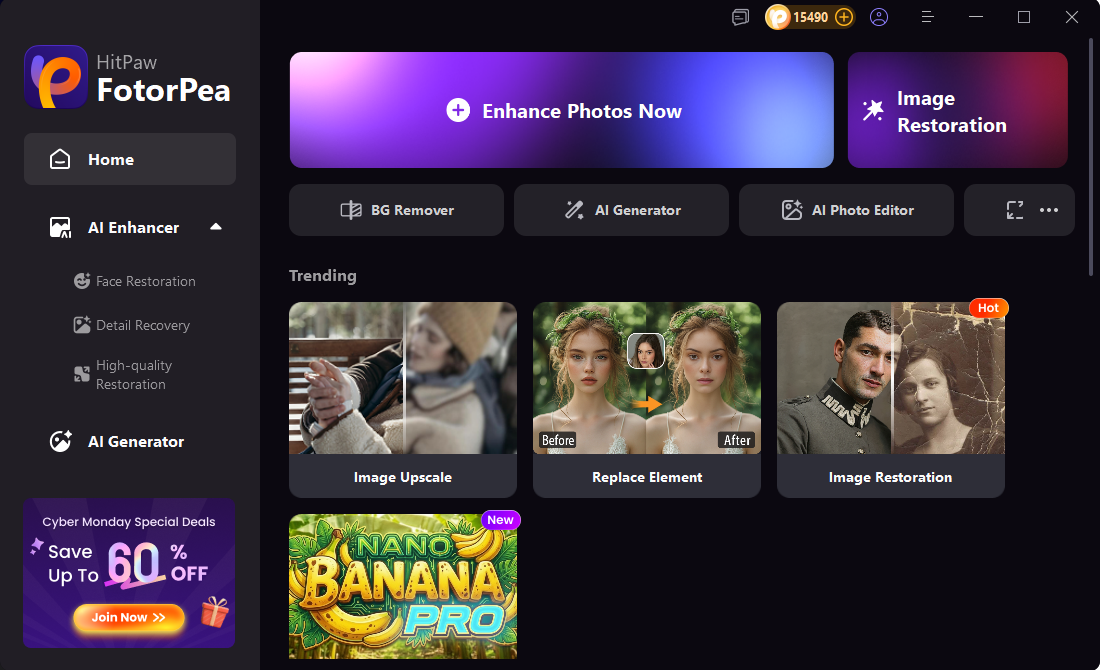
Step 1: Open HitPaw FotorPea and click AI Photo Editor.
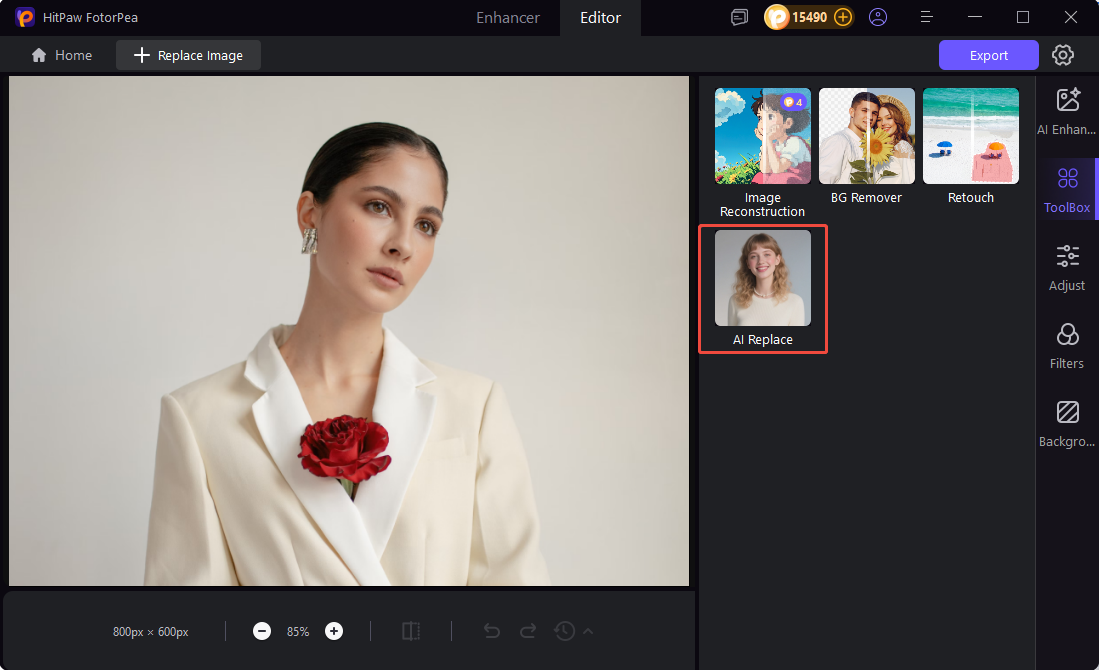
Step 2: Upload your image, go to Toolbox, and select AI Replace.
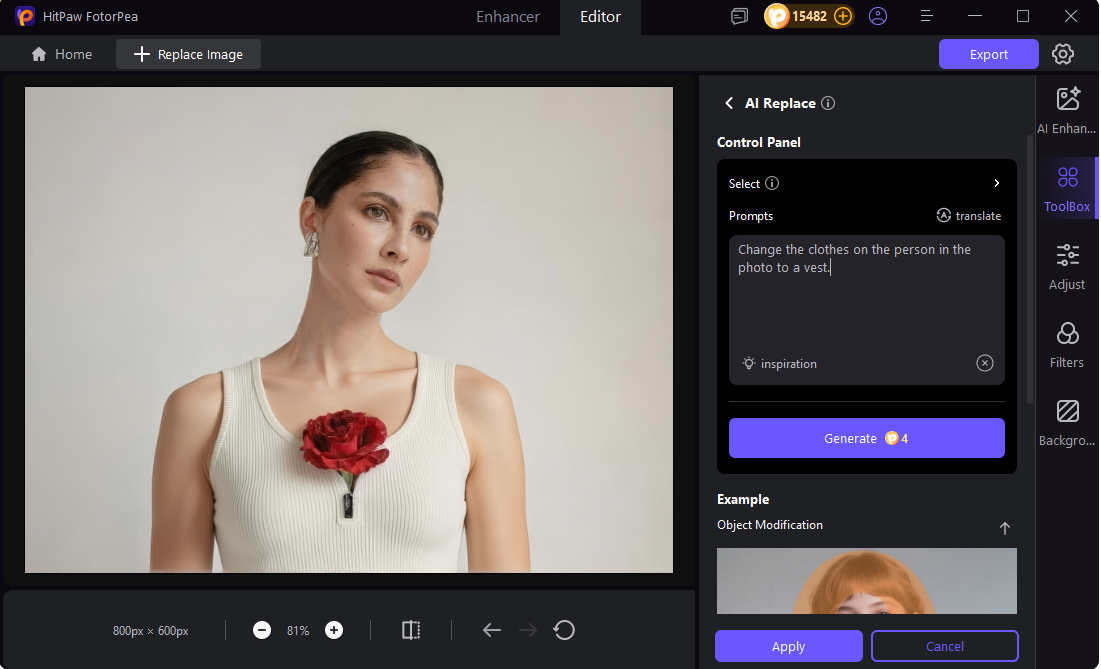
Step 3: Enter your text prompt and click Generate to change the clothing on the person in the image.
Part 5. FAQs on Undress AI Generator
Q1. What online tools are available for Undress AI?
A1. HitPaw FotorPea provides a fast, safe, and convenient online AI tool that lets you quickly change clothing in images without installing any software.
Q2. How to use Undress AI Image to Video?
A2. You can transform images into videos with AI-generated clothing changes. HitPaw provides easy-to-use tools for both image and video edits.
Q3. What is the best Undress Tool?
A3. The best Undress Tool is HitPaw FotorPea, which allows safe and high-quality AI clothing edits with simple controls.
Q4. How to use AI Generator Undress?
A4. Simply upload your image, enter a text prompt, and let HitPaw FotorPea’s AI generate the new outfit automatically.
Bottom Line
We have listed the 6 spectacular undresser ai tools, and all the options given in this post are worth your attention.
With HitPaw FotorPea’s AI Generator, clothing design is no longer limited by traditional tools—from character appearances to fashion styles, your creativity can be precisely realized through intelligent technology, opening the door to infinite digital creation potential.
(*Final Reminder: This guide is for informational purposes only and does not constitute legal advice. Before using the relevant features, please make sure to:
① Consult a qualified legal professional in your jurisdiction to evaluate any legal risks that may apply;
② Carefully read and fully understand the HitPaw Term of Service and HitPaw Privacy Policy;
③ Ensure that all generated content complies with applicable local, state, and federal laws and regulations, particularly those related to synthetic media and deepfake technologies.)
 HitPaw Edimakor
 HitPaw VoicePea

Share this article:
Select the product rating:
Daniel Walker
Editor-in-Chief
This post was written by Editor Daniel Walker whose passion lies in bridging the gap between cutting-edge technology and everyday creativity. The content he created inspires the audience to embrace digital tools confidently.
View all ArticlesLeave a Comment
Create your review for HitPaw articles